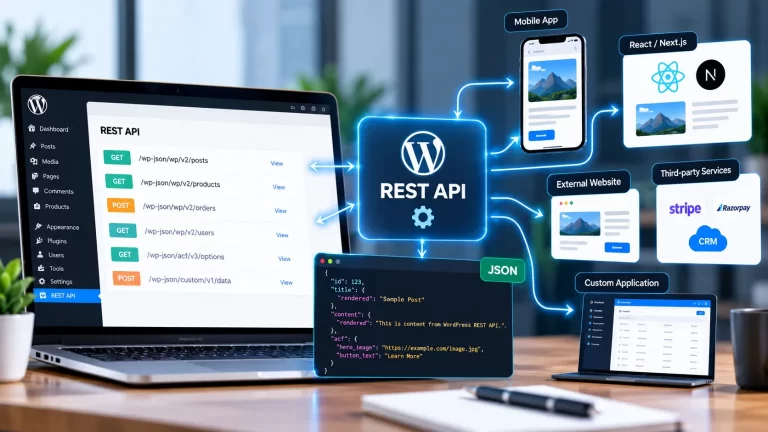
WooCommerce multi vendor marketplace development allows businesses to transform a WooCommerce website into a marketplace where multiple independent sellers can register, add products and manage their orders. Instead of selling products only from one business, a multi-vendor marketplace allows different vendors to sell through the same website.The marketplace owner manages the overall platform, while individual vendors can manage their own products, orders and earnings.
Table of Contents
Businesses planning a customized marketplace can work with a WooCommerce development company like NJ Technos to build functionality around their specific marketplace model.
What Is a WooCommerce Multi Vendor Marketplace?
A WooCommerce multi-vendor marketplace is an ecommerce website where multiple sellers operate through one WooCommerce platform.
A typical structure looks like:
Marketplace Owner → Vendors → Products → Customers → Orders
The marketplace owner controls the platform, while vendors manage their own stores.
Depending on the marketplace requirements, vendors may be able to:
- Register
- Create seller profiles
- Add products
- Update inventory
- Manage orders
- View sales
- Track commissions
- Request payouts
WooCommerce provides the ecommerce foundation, while multi-vendor functionality adds seller management and marketplace-specific features.
9 Powerful Features of WooCommerce Multi Vendor Marketplace Development
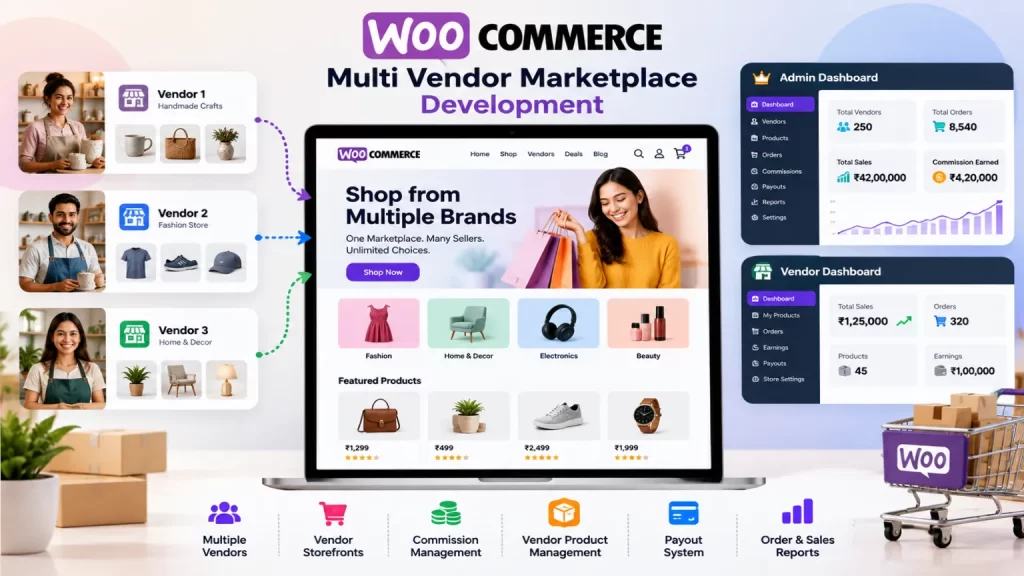
1. Vendor Registration and Approval
A marketplace should provide a dedicated seller registration process.
Vendors can submit information such as:
- Business name
- Seller name
- Phone number
- Business category
- Address
- Tax information
- Bank details
The marketplace administrator can review the application before approving the vendor.
This helps maintain control over who can sell products on the platform.
2. Individual Vendor Dashboard
Each seller can receive a dedicated dashboard.
The dashboard may display:
- Products
- Orders
- Sales
- Earnings
- Commission
- Customers
- Inventory
- Payouts
A simple dashboard makes it easier for vendors to manage their marketplace business without accessing the main WordPress administration area.
3. Vendor Product Management
Approved vendors can add and manage their own products.
They may be able to update:
- Product name
- Description
- Price
- Images
- SKU
- Stock
- Categories
- Attributes
- Variations
The marketplace owner can decide whether products are published immediately or require administrator approval.
4. Commission Management
Commission management is one of the most important features of a multi-vendor marketplace.
The marketplace can define commission rules such as:
| Product Sale | Vendor Commission | Marketplace Share |
|---|---|---|
| ₹1,000 | ₹900 | ₹100 |
| ₹2,000 | ₹1,800 | ₹200 |
| ₹5,000 | ₹4,500 | ₹500 |
Different vendors can also have different commission rates.
For example, one seller may have a 10% commission while another has 15%, depending on the marketplace agreement.
5. Vendor Order Management
Vendors should be able to view orders related to their own products.
A vendor dashboard can show:
- New orders
- Processing orders
- Completed orders
- Cancelled orders
- Refunded orders
- Shipping information
The vendor should not normally have access to another seller’s private order information.
This separation is important for marketplace administration.
6. Vendor Payout System
A marketplace needs a method for transferring vendor earnings.
Depending on the payment architecture, the platform can support:
- Manual payouts
- Scheduled payouts
- Bank transfers
- Payment gateway payouts
- Minimum payout thresholds
For example:
Vendor Earnings → Commission Deducted → Available Balance → Payout Request → Payment
Payout rules should be clearly defined before development.
7. Vendor Store Pages
Each seller can have an individual storefront within the marketplace.
A vendor page can display:
- Seller name
- Seller logo
- Seller description
- Products
- Ratings
- Reviews
- Categories
- Contact information where appropriate
This allows customers to explore products from a specific seller.
8. Product Reviews and Vendor Ratings
Customer reviews can help shoppers evaluate products and sellers.
A marketplace can display:
- Product rating
- Product reviews
- Vendor rating
- Number of completed orders
- Customer feedback
The administrator can also define moderation rules for reviews.
9. Marketplace Analytics
A marketplace owner needs visibility into overall platform performance.
An administrator dashboard can display:
- Total sales
- Vendor sales
- Marketplace commission
- Orders
- Active vendors
- Top-selling products
- Payouts
- Refunds
For example:
| Marketplace Metric | Example |
|---|---|
| Active Vendors | 250 |
| Total Orders | 8,500 |
| Gross Sales | ₹42,00,000 |
| Marketplace Commission | ₹4,20,000 |
| Products | 12,000 |
These reports can help marketplace owners understand business performance.
How Does a WooCommerce Multi Vendor Marketplace Work?
The basic process is:
Vendor Registration → Approval → Product Upload → Product Approval → Customer Purchase → Order Processing → Commission Calculation → Vendor Payout
The marketplace owner manages the overall platform.
Vendors manage their products and orders.
Customers browse products from different sellers and complete purchases through the marketplace checkout.
Marketplace Owner Dashboard
The administrator should have complete control over the platform.
The dashboard can manage:
- Vendors
- Products
- Orders
- Customers
- Commissions
- Payouts
- Refunds
- Reviews
- Categories
- Marketplace settings
Administrators can also suspend vendors or products when required.
Vendor Dashboard vs Admin Dashboard
| Feature | Admin | Vendor |
|---|---|---|
| Manage vendors | Yes | No |
| Manage all products | Yes | Own products |
| Manage own products | Yes | Yes |
| View all orders | Yes | Own orders |
| View commission | Yes | Own commission |
| Manage payouts | Yes | Request/view |
| Manage customers | Yes | Limited |
| Marketplace settings | Yes | No |
| Reports | Full | Own sales |
This role separation keeps the marketplace organized.
WooCommerce Multi Vendor Marketplace Product Management
A marketplace can have thousands of products from different sellers.
Product management should therefore support:
- Categories
- Attributes
- Variations
- Stock
- SKU
- Pricing
- Product images
- Product approval
The administrator can also establish marketplace-wide product rules.
For example, certain product categories may require manual approval before publication.
Vendor Commission Models
Different marketplaces use different commission structures.
Percentage Commission
The marketplace takes a percentage of each sale.
For example:
Vendor Sale: ₹1,000
Commission: 10%
Marketplace Share: ₹100
Fixed Commission
A fixed amount is deducted from each order.
Category-Based Commission
Different product categories can have different commission rates.
Vendor-Based Commission
Individual sellers can have customized commission agreements.
A custom marketplace can support one or more of these models depending on business requirements.
Vendor Shipping Management
Shipping can become complex when one order contains products from multiple vendors.
A marketplace may need to determine:
- Which vendor ships the product
- Shipping cost
- Delivery location
- Tracking information
- Order splitting
- Vendor fulfillment
The exact workflow should be planned before development because shipping requirements vary between marketplaces.
Multi-Vendor Checkout
Customers should be able to purchase products from multiple vendors through a smooth checkout experience.
For example:
Vendor A Product + Vendor B Product → One Customer Order
Behind the scenes, the system may need to separate the order into vendor-specific fulfillment information.
This requires careful WooCommerce configuration and testing.
WooCommerce Multi Vendor Marketplace Payment System
Payment architecture is an important part of marketplace development.
The platform needs to determine how customer payments are processed and how vendor earnings are calculated.
Depending on the payment provider, the marketplace may use:
- Split payments
- Delayed payouts
- Manual payouts
- Scheduled payouts
Payment processing should be designed according to the marketplace’s country, business model and payment provider capabilities.
Mobile-Friendly Marketplace
Customers and vendors may access the marketplace from smartphones.
The website should therefore provide responsive interfaces for:
- Product browsing
- Search
- Filters
- Cart
- Checkout
- Vendor dashboard
- Order management
Vendor dashboards should also remain usable on smaller screens.
Search and Product Filters
Large marketplaces require efficient search.
Customers may want to filter products by:
- Category
- Price
- Brand
- Vendor
- Rating
- Availability
- Attributes
A good search and filtering system helps customers find relevant products faster.
SEO for Multi Vendor Marketplaces
SEO should be considered from the beginning of WooCommerce multi vendor marketplace development.
Important areas include:
- Product URLs
- Category pages
- Vendor pages
- Product descriptions
- Internal linking
- Structured data
- Image ALT text
- Canonical URLs
- XML sitemap
- Mobile usability
Google’s Search Central documentation provides guidance for creating search-friendly websites.
Vendor pages can also create additional landing pages when they contain useful, unique content.
Security for Multi Vendor WooCommerce Websites
Multi-vendor websites have multiple user roles, making access control especially important.
The platform should protect:
- Vendor accounts
- Customer information
- Orders
- Payment-related information
- Commission data
- Payout information
Appropriate authentication, permissions, validation and secure coding practices should be implemented.
Custom WooCommerce Plugin Development
Ready-made multi-vendor plugins can provide many common marketplace features.
However, some marketplaces have unique requirements.
For example:
- Custom commission rules
- Vendor verification
- Custom payout logic
- Vendor-specific shipping
- Product approval workflow
- Marketplace subscriptions
- Custom vendor dashboards
- External API integration
In such cases, custom WooCommerce plugin development can be used to build functionality around the marketplace’s specific workflow.
WooCommerce Multi Vendor Marketplace vs Single Vendor Store
| Feature | Single Vendor Store | Multi Vendor Marketplace |
|---|---|---|
| Sellers | One | Multiple |
| Product ownership | Business | Individual vendors |
| Vendor dashboard | Not required | Required |
| Commission | Usually no | Required |
| Vendor payouts | Not required | Required |
| Seller approval | Not required | Usually required |
| Marketplace analytics | Basic | Advanced |
| Vendor storefronts | No | Possible |
A multi-vendor marketplace is therefore more complex than a standard WooCommerce store.
Common Marketplace Development Mistakes
No Vendor Approval Process
Allowing every seller to publish products immediately can create quality-control problems.
Complicated Vendor Dashboard
Vendors should be able to understand their dashboard quickly.
Unclear Commission Rules
Commission and payout rules should be clearly defined.
Poor Order Separation
Orders involving multiple vendors need careful handling.
Ignoring Shipping
Vendor-specific shipping can become complicated without proper planning.
Weak Product Moderation
The marketplace should have clear rules for product approval and removal.
No Mobile Testing
Both customers and vendors may use smartphones, so mobile testing is essential.
How Much Does WooCommerce Multi Vendor Marketplace Development Cost?
The cost depends on the marketplace’s functionality.
A basic marketplace may require:
- Vendor registration
- Vendor dashboard
- Product management
- Commission
- Orders
- Payouts
A more advanced marketplace may require:
- Vendor subscriptions
- Vendor verification
- Multiple commission models
- Split payments
- Advanced shipping
- Vendor analytics
- Custom APIs
- Mobile applications
- Custom dashboards
Therefore, the final cost should be estimated after defining the complete marketplace workflow.
How to Choose a WooCommerce Marketplace Development Company
Before hiring a development company, check its experience with:
- WooCommerce
- Multi-vendor marketplaces
- WordPress
- Custom plugins
- Payment gateways
- Vendor dashboards
- Commission systems
- Shipping integrations
- API development
- Security
- Performance optimization
The development team should understand both WooCommerce and marketplace-specific business requirements.
Frequently Asked Questions
What is WooCommerce multi vendor marketplace development?
It is the process of creating a WooCommerce marketplace where multiple independent vendors can sell products through one ecommerce website.
Can multiple vendors sell on one WooCommerce website?
Yes. Multi-vendor functionality can allow different sellers to create products and manage their own orders.
Can vendors have separate dashboards?
Yes. Vendors can receive dashboards for managing products, orders, sales and earnings.
Can the marketplace charge vendor commissions?
Yes. Percentage, fixed, category-based or vendor-specific commission models can be implemented.
Can vendors manage their own products?
Yes. Vendors can be given permission to create and manage their own products.
Can vendors receive payouts?
Yes. Payout functionality can be configured according to the marketplace’s payment system.
Can customers buy from multiple vendors?
Yes. The marketplace can be configured to support purchases involving products from different sellers.
Can WooCommerce multi-vendor functionality be customized?
Yes. Custom plugins and integrations can be developed for marketplace-specific requirements.
Final Thoughts
WooCommerce multi vendor marketplace development allows businesses to create an ecommerce platform where multiple sellers can manage products and sell through one website.
A successful marketplace needs more than product listings. Vendor registration, seller dashboards, commissions, order management, payouts, shipping, product approval and analytics all need to work together.
For marketplaces with unique requirements, custom WooCommerce development can provide the flexibility to build vendor workflows and marketplace functionality around the business model.