WordPress REST API integration services connect your WordPress site with other software through secure, well-designed API endpoints. A developer builds custom endpoints, or consumes third-party APIs, so data moves between WordPress and your mobile app, CRM, ERP, payment system, headless frontend or any other tool, without manual copying. Good integration is secure, documented and built to keep working when either side changes.
Many integrations fail for simple reasons: endpoints with no permission checks, API keys stored carelessly, no error handling when the other system is down, or no plan for updates. This guide covers who needs WordPress REST API integration services, what they include, how authentication works, 7 checks for choosing a developer, how projects are phased, and why NJ Technos can help.
Table of Contents
What is the WordPress REST API?
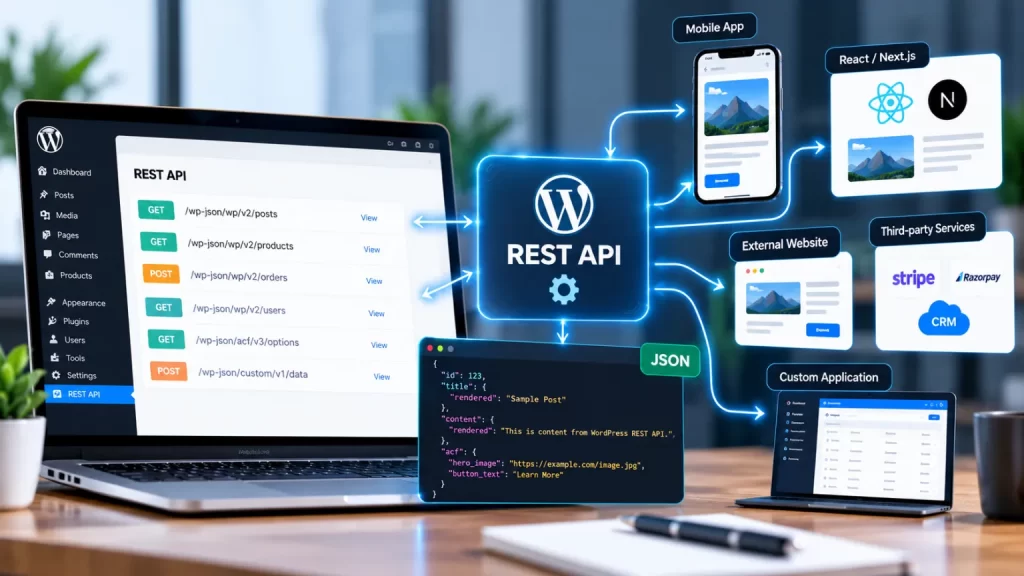
The WordPress REST API lets other systems read and change WordPress data over standard web requests. It uses methods such as GET, POST, PUT and DELETE, and endpoints can expose posts, pages, users, custom post types, and your own custom data. The official WordPress REST API handbook is the reference developers use, and it is worth skimming even if you won’t write code yourself.
The API works in two directions. WordPress can expose data for other apps to use, and it can also call other systems’ APIs to send or fetch information.
Who needs WordPress REST API integration services?
| Who | What they typically need |
|---|---|
| Businesses with a mobile app | WordPress content, users or orders available to the app |
| Sites with a headless frontend | A React, Next.js or similar frontend reading WordPress data |
| Companies using a CRM or ERP | Leads, customers and orders synced automatically |
| WooCommerce stores | Inventory, shipping, accounting or marketplace sync |
| Directory and listing sites | Data feeds from or to partner systems |
| Membership and course sites | Access, progress and payments connected to external tools |
| Teams tired of manual data entry | Automated flows between WordPress and other software |
If you plan a decoupled frontend, read our guide on headless WordPress development India, since the REST API sits at the centre of that setup.
What do WordPress REST API integration services include?
Thorough WordPress REST API integration services cover these 12 things:
- Requirements and API review. Understanding what data moves, in which direction, how often and who may access it.
- Endpoint design. Custom routes under your own namespace, with versioning so future changes don’t break existing connections.
- Authentication. Choosing the right method: cookie with nonce for logged-in admin scripts, and application passwords or another approved method for external clients.
- Permission checks. A proper permission callback on every custom route, so private data stays private.
- Validation and sanitisation. Checking and cleaning every incoming value before it touches your database.
- Custom data exposure. Safely exposing custom post types, fields and meta, including ACF data where needed.
- Calling external APIs. Requests to third-party services, with timeouts, error handling and retries.
- Caching. Storing results where suitable, so your site stays fast and doesn’t hit API limits.
- Webhooks. Receiving events from other systems, for example a payment or order update.
- Logging and monitoring. Records of failures so problems are caught early.
- Testing and documentation. Tested endpoints with clear documentation for your team or other developers.
- Security review. Checking for exposed data, weak keys and overly open routes.
Important: always back up your site and build on a staging copy first. Integrations can change real customer and order data, so test with safe sample data before connecting live systems.
How do you choose WordPress REST API integration services? 7 checks
These 7 checks help you shortlist the right provider of WordPress REST API integration services.
1. Ask for real integration examples
Ask what systems they have connected to WordPress, such as CRMs, apps, payment tools or ERPs, and what went wrong and how they solved it.
2. Check how they handle authentication
A good developer explains which authentication method fits each connection and why. Keys and passwords should never sit in public code or be shared in emails.
3. Confirm permission checks on every route
Ask how they make sure each custom endpoint only returns data to people who should see it. Open endpoints should be open on purpose.
4. Ask how they handle failures
The other system will go down at some point. Ask about timeouts, retries, logging and what the user sees when something fails.
5. Check their approach to security
Integrations expand your attack surface. The official WordPress hardening guide is a good reference, and our WordPress security hardening service guide covers the wider picture.
6. Make sure you own everything
Your code, API keys, accounts, hosting and documentation should belong to you, with a clear handover.
7. Agree on maintenance
WordPress, plugins and third-party APIs all change. Agree on monitoring and response times, such as through a website maintenance AMC, in writing.
How is an integration project phased, and what affects cost?
Most projects with a provider of WordPress REST API integration services follow these phases:
| Phase | What happens |
|---|---|
| 1. Discovery | Map systems, data, direction, volume and security needs |
| 2. API review | Study the third-party API documentation and limits |
| 3. Design | Plan endpoints, authentication, data format and error handling |
| 4. Development | Build and configure the integration on staging |
| 5. Testing | Test normal flows, edge cases, failures and performance |
| 6. Go live | Connect live systems, monitor early traffic and fix issues |
| 7. Support | Monitor, update and extend the integration |
What affects cost: the number of systems and endpoints, the quality of the third-party API documentation, the amount of data and how often it syncs, authentication needs, custom admin screens, error handling and logging depth, existing site code quality, and the level of ongoing support. Ask for a written quote after discovery.
Why choose NJ Technos for WordPress REST API integration services?
NJ Technos is a Delhi-based web design and development company, working since 2006 and with 500+ websites built. As a provider of WordPress REST API integration services, we bring:
- Custom WordPress development depth. We build themes and plugins, so integrations are written as proper, maintainable code. See our guide on custom WooCommerce plugin development India.
- Security-minded builds. We treat authentication, permissions and validation as part of the job, not an extra.
- Practical documentation. You get clear notes on what was built and how it works.
- Performance awareness. API calls shouldn’t slow down your pages. See our WooCommerce speed optimization service guide.
- Support after launch. Website maintenance and support is one of our services.
If your integration involves online payments, also read our guide on WooCommerce payment gateway integration India, and see all our services.
Need to connect WordPress with another system?
Tell us which systems you use and what data should move between them, and we’ll recommend a clear plan and quote. Reach us through our contact page, email info@njtechnos.com or call +91 783 830 0319.
FAQs: WordPress REST API integration services
Add these with the Rank Math FAQ block so FAQPage schema is generated.
What are WordPress REST API integration services?
They are services that connect WordPress to other software, by building custom API endpoints or by calling third-party APIs, so data flows between systems securely and automatically.
Is the WordPress REST API secure?
It can be, when routes have proper permission checks, inputs are validated and authentication is handled correctly. Insecure custom endpoints are a common risk, so have them reviewed.
How is a REST API connection authenticated?
It depends on the use case. Logged-in admin scripts commonly use cookies with a nonce, while external applications commonly use application passwords or another approved authentication method.
Can WordPress connect to my CRM or ERP?
Usually yes, if the other system offers an API. The effort depends on the quality of its documentation and the data you want to sync.
Will API integrations slow down my site?
They can if poorly built. Caching, background processing and sensible timeouts help keep pages fast.
Do I need a custom plugin for an integration?
Often yes. Putting integration code in a plugin, rather than a theme, keeps it working when the design changes.
Do you work with clients outside Delhi?
Yes. NJ Technos is based in Delhi and works with clients across India.
Final verdict: WordPress REST API integration services
Good WordPress REST API integration services start with clear requirements, then build secure endpoints, choose the right authentication, handle failures gracefully and document everything. Choose a developer who explains trade-offs, protects your data, lets you own the code and stays available after launch.
If you need WordPress REST API integration services that businesses in India can rely on, NJ Technos has been building and supporting WordPress websites since 2006.
Let’s connect your systems
Share what you want to connect and why, and we’ll recommend a clear plan. Contact us through our contact page.