A WordPress security hardening service reviews your WordPress site, hosting and settings, closes the common weak points (outdated software, weak logins, loose file permissions, file editing in the dashboard, no firewall, no backups) and sets up monitoring afterwards. It reduces risk rather than guaranteeing zero attacks, and it works best alongside regular maintenance.
Most WordPress sites aren’t hacked by clever attackers. They’re hacked through outdated plugins, weak passwords and open doors that nobody closed. WordPress’s own documentation says that website compromises are most often attributed to the application, not the hosting infrastructure. That’s the part a WordPress security hardening service takes care of.
This guide covers what a WordPress security hardening service includes, a practical checklist, 7 checks to choose a provider in India, how projects are phased, and why NJ Technos can help.
Table of Contents
What does a WordPress security hardening service include?
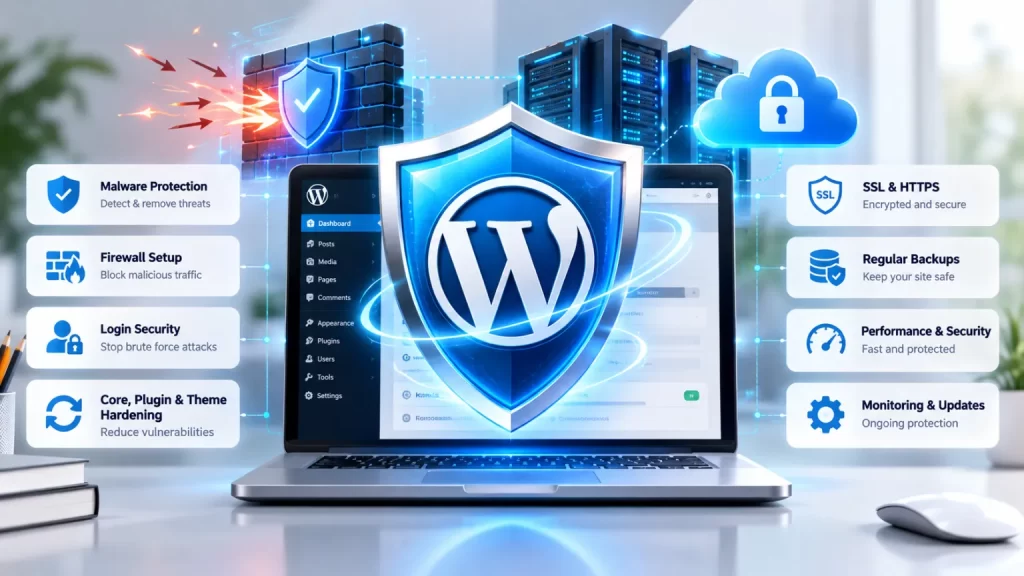
A WordPress security hardening service usually covers these areas:
| Area | What is done | Why it matters |
|---|---|---|
| Updates | WordPress core, themes and plugins updated; unused ones removed | Old versions are the easiest to attack |
| Logins | Strong passwords, two-step authentication, no default “admin” username, brute-force protection | Stops password guessing |
| File permissions | Directories and files locked down to the minimum needed | Limits what an attacker can change |
| Dashboard settings | File editing from the dashboard disabled | Removes a common first tool for attackers |
| HTTPS | SSL certificate and secure admin access | Encrypts logins and data |
| Firewall | A web application firewall, as a plugin, server rule or external service | Filters malicious requests before they reach WordPress |
| Backups | Regular, off-server backups with a tested restore | Lets you recover fast |
| Monitoring | Logs, file-change checks and uptime alerts | Helps you detect problems early |
| Access control | Admin, editor and author roles reviewed | Only the right people can do the right things |
Hardening is about risk reduction, not risk elimination. No service can promise that a site will never be attacked.
How do WordPress sites actually get hacked?
The official WordPress hardening guide describes the two most common kinds of attack:
- Crafted requests aimed at known vulnerabilities, often in outdated plugins and software.
- Brute-force password guessing against the login page.
The same guide says that if a vulnerability is fixed in a new WordPress version, the details needed to exploit it are almost certainly public, which makes old versions easier targets. That’s why updates matter. You can read the full guide here: Hardening WordPress on developer.wordpress.org.
Who needs a WordPress security hardening service?
| Who | What they typically need |
|---|---|
| Business and company websites | Protect leads, reputation and search rankings |
| WooCommerce stores | Safer checkout, customer data and payments |
| Membership and LMS sites | Protect user accounts and paid content |
| Sites with many plugins or custom code | A review of plugins and permissions |
| Sites that have been hacked before | Clean-up, then hardening so it doesn’t happen again |
| Agencies and freelancers | A repeatable hardening standard for client sites |
If you run an online store, see our guides on WooCommerce speed optimization service and custom WooCommerce plugin development India, because speed, plugins and security all affect each other.
What is on a WordPress hardening checklist?
Based on the official WordPress hardening guide and common practice, a thorough WordPress security hardening service checks these 12 things:
- Keep WordPress, themes and plugins updated. Turn on automatic updates where suitable.
- Delete unused plugins and themes, and only use trusted sources such as WordPress.org or well-known companies.
- Use strong, unique passwords and enable two-step authentication.
- Rename the default “admin” account so the username isn’t easy to guess.
- Limit login attempts and protect against brute-force attacks.
- Use SFTP, not plain FTP, if your host provides it.
- Lock down file permissions. The handbook gives directories 755 and files 644 as one scheme, and says wp-config.php should only be readable by you and the web server, which generally means 400 or 440.
- Disable file editing in the dashboard. Add
define( 'DISALLOW_FILE_EDIT', true );to wp-config.php. - Use HTTPS for the whole site, including the admin area.
- Add a firewall. This can be a plugin, a server-level WAF or an external service.
- Back up regularly, keep copies off the server, and test a restore.
- Log and monitor. Watch logs, file changes and uptime.
Important: always take a backup and test changes on a staging copy first. A wrong permission or a blocked login page can take a live site offline.
How do you choose a WordPress security hardening service in India? 7 checks
These 7 checks help you shortlist the right WordPress security hardening service in India.
1. Ask for a written scope and checklist
A good provider tells you exactly what will be checked and changed, in writing, before they start.
2. Make sure backups come first
A full backup, with a tested restore, should be taken before any change. If a provider skips this, walk away.
3. Check that changes are tested on staging
Hardening can break plugins and themes. Ask whether changes are tested on a copy before going live.
4. Be wary of “100% hack-proof” promises
No one can guarantee that a site will never be attacked. WordPress’s own documentation describes security as risk reduction, not elimination. A trustworthy provider says the same.
5. Confirm that you own everything
Your hosting, domain, admin access and security-plugin licences should be in your name, with a clear handover and no hidden access.
6. Ask what monitoring and reporting you get
Ask how problems are detected, who is told and how fast, and what reports you receive.
7. Plan ongoing maintenance, not a one-off
Hardening is not a one-time fix. Plugins and WordPress need regular updates, and new vulnerabilities appear. Ask for a maintenance plan, such as a website maintenance AMC, with clear response times in writing.
How is a hardening project phased, and what affects cost?
Most projects with a WordPress security hardening service follow these phases:
| Phase | What happens |
|---|---|
| 1. Audit | Review core, plugins, themes, users, permissions, hosting and logs |
| 2. Backup and staging | Take a full backup and create a staging copy |
| 3. Hardening | Apply the checklist: updates, logins, permissions, settings, HTTPS |
| 4. Firewall and monitoring | Set up a firewall, backups, logs and alerts |
| 5. Testing | Test the site, forms, checkout and admin area |
| 6. Report and handover | Share what was found, what was changed and what’s left to do |
| 7. Maintenance | Ongoing updates, backups and monitoring |
What affects cost: the size and complexity of the site, the number of plugins and custom code, whether the site has been hacked before, the hosting environment, whether you need a firewall service or monitoring, and the level of ongoing maintenance. Ask for a clear quote after an audit.
Why choose NJ Technos for WordPress security hardening?
NJ Technos is a Delhi-based web design and development company, working since 2006 and with 500+ websites built. As a WordPress security hardening service in India, we bring:
- WordPress development experience. We build and maintain WordPress and WooCommerce sites, so we understand how themes, plugins and custom code fit together.
- A careful process. Backup first, test on staging, then harden, so your live site stays up.
- Maintenance and support. Website maintenance and support is one of our services, so hardening can continue as ongoing care.
- Clear reporting. You get a plain-language summary of what was found and what was changed.
- Support after delivery. We stay with you for updates, fixes and new features.
See our services and our website maintenance AMC in India page for more. If you’re moving a site to an online store, read our WordPress to WooCommerce migration service guide.
Want your WordPress site hardened?
Tell us about your site, plugins and hosting, and we’ll review it and recommend a clear plan. Contact us through our contact page, email info@njtechnos.com or call +91 783 830 0319.
FAQs: WordPress security hardening service
What is a WordPress security hardening service?
A WordPress security hardening service reviews your site, hosting and settings, closes common weak points such as outdated plugins, weak logins and loose file permissions, adds a firewall, backups and monitoring, and reports what was changed.
Can a WordPress security hardening service make my site 100% secure?
No. Security is about reducing risk, not eliminating it. Hardening makes attacks harder and recovery faster, but no provider can guarantee a site will never be attacked.
Is a security plugin enough?
A security plugin helps, but it’s one layer. Updates, strong logins, file permissions, backups, HTTPS and monitoring matter too.
How often should WordPress be updated?
Keep WordPress, themes and plugins up to date, and apply security updates promptly. Test updates on a staging copy first for important sites.
What should I do if my WordPress site is hacked?
Take the site offline if needed, restore from a clean backup, change all passwords, update everything and then harden the site. WordPress.org has a guide titled “My site was hacked”. A provider can clean the site and prevent a repeat.
How much does WordPress security hardening cost in India?
It depends on the size of the site, the number of plugins and custom code, the hosting, and whether you want ongoing maintenance. Ask for a clear quote after an audit.
Do you work with clients outside Delhi?
Yes. NJ Technos is based in Delhi and works with clients across India.
Final verdict: choosing a WordPress security hardening service
A good WordPress security hardening service reduces risk step by step: a clear scope, backups first, staging tests, hardening, a firewall, monitoring and a report. Choose a provider who is honest about what hardening can and can’t do, makes sure you own everything and offers ongoing maintenance.
If you’re looking for a WordPress security hardening service that businesses in India can rely on, NJ Technos has been building and maintaining WordPress websites since 2006. Read the official WordPress hardening guide and the WordPress security whitepaper for more background.
Let’s secure your WordPress site
Share your site, plugins and hosting details, and we’ll recommend a clear plan. Reach us through our contact page.