A WordPress malware removal service India businesses hire finds and deletes malicious code from your website, closes the security hole the attacker used, restores clean files and database content, and gets your site off Google’s warning lists. A good service doesn’t stop at cleaning. It also finds the root cause, hardens the site and protects you from reinfection.
If your website is redirecting visitors, showing spam pages in Google or has been suspended by your host, every hour of downtime costs you leads, sales and trust. Most infections start with outdated plugins, weak passwords and open doors nobody closed, which is why cleanup and WordPress security hardening work best together. This guide covers the warning signs, common causes, what a proper cleanup involves, 7 checks for choosing a provider, and why NJ Technos handles WordPress security.
Table of Contents
Signs your WordPress website has malware
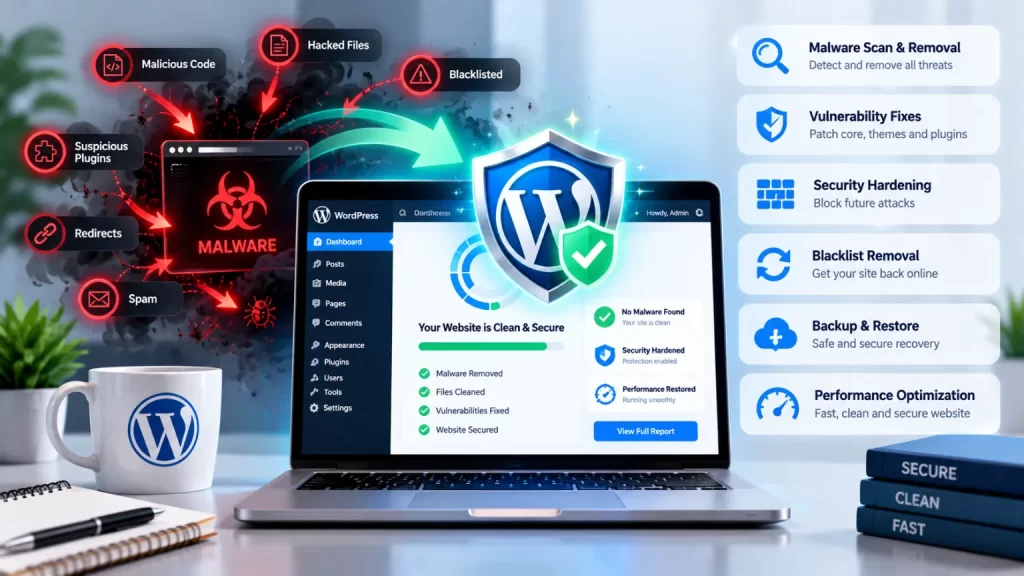
Malware doesn’t always crash your site. Often it hides, so look for these warning signs:
| Sign | What it usually means |
|---|---|
| Visitors are redirected to unknown or spam websites | Malicious JavaScript or injected redirect rules |
| Google shows “This site may be hacked” or a red warning page | Your domain has been flagged by Google Safe Browsing |
| Strange pages or foreign-language spam in Google results | SEO spam injected into your site or database |
| Unknown admin users in your dashboard | An attacker created a backdoor account |
| Your host suspends the account or sends an abuse notice | Malware is sending spam or attacking other servers |
| Sudden slowdown or high server usage | Hidden scripts running in the background |
| Files you didn’t upload, especially PHP files in the uploads folder | Backdoors or web shells |
| Your own login stops working | Passwords or user records were changed |
One sign alone isn’t proof, but two or more together mean you should act quickly.
How do WordPress websites get infected?
WordPress itself is generally safe when kept updated. The official WordPress hardening guide names crafted requests aimed at known vulnerabilities and brute-force password guessing as the most common kinds of attack. In practice, most infections come from what’s added around WordPress:
- Outdated plugins and themes: Known vulnerabilities are scanned for automatically by bots, often within hours of becoming public.
- Nulled (pirated) themes and plugins: Free copies of premium products very often ship with hidden malware.
- Weak or reused passwords: Brute-force and credential-stuffing attacks target the login page.
- Poor hosting setup: Shared servers with weak isolation can let one infected site affect others.
- Abandoned plugins: Plugins no longer maintained never receive security fixes.
- No two-factor authentication or login limits: Attackers get unlimited tries.
Knowing the entry point matters because cleaning the site without closing it simply invites the attacker back. The same guide notes that once a vulnerability is fixed in a new version, the details needed to exploit older versions are almost certainly public, so staying updated matters. For background, see the WordPress security overview.
What does a WordPress malware removal service India-wide actually do?
A professional WordPress malware removal service India clients can trust follows a clear process:
| Step | What happens |
|---|---|
| 1. Backup | Take a full copy of files and database before touching anything |
| 2. Contain | Put the site in maintenance mode so visitors and search engines aren’t exposed |
| 3. Scan and identify | Check core files, themes, plugins, uploads, .htaccess, wp-config.php, scheduled tasks and database tables |
| 4. Remove malware | Delete injected code, backdoors and rogue files, and clean affected database entries |
| 5. Restore clean software | Replace WordPress core, plugins and themes with fresh copies from trusted sources |
| 6. Clean up users and keys | Remove unknown admins, reset all passwords and regenerate security keys |
| 7. Close the entry point | Update or remove the vulnerable component and fix server permissions |
| 8. Re-scan and test | Confirm the site is clean and everything works as before |
| 9. Delist and recover | Request a Google review through Search Console and clean up spam URLs |
| 10. Harden and monitor | Add a firewall, login protection, backups and update routines |
Can a security plugin remove malware on its own?
Security plugins are useful for scanning and prevention, but they have limits. They can miss obfuscated code and backdoors hidden in unusual places, and automated cleaning can break your theme or delete legitimate files. A plugin works best as part of a manual cleanup done by someone who understands WordPress files and the database, followed by the steps in our WordPress security hardening service checklist.
How do you choose a WordPress malware removal service India-wide? 7 checks
Use these 7 checks to shortlist the right WordPress malware removal service India has to offer.
1. Ask how they find backdoors
Attackers usually leave more than one way back in. Ask how the provider searches for hidden files, rogue admin users and scheduled tasks, not just visible infections.
2. Confirm they fix the root cause
A cleanup without a root-cause check is temporary. The provider should tell you which plugin, theme, password or server setting let the attacker in.
3. Check how they handle your database
Malware often lives in posts, options and widget content, not only in files. Make sure they clean the database carefully without damaging your real content.
4. Ask about Google blacklist removal
If Google has flagged your site, they should handle the Search Console review and help clear spam pages from search results.
5. Look for a reinfection policy
Ask what happens if the same infection returns. A clear follow-up policy shows confidence in their work.
6. Make sure your data is backed up first
A responsible provider backs up the infected site before cleaning, so nothing is lost if something goes wrong.
7. Agree on hardening and monitoring
Cleaning solves today’s problem. Ask what ongoing protection is included: firewall, update schedule, backups and regular scans, ideally under a website maintenance AMC with response times in writing.
What affects cleanup time and cost?
There’s no single price, because every infection differs. These factors matter most:
- How many files and database tables are affected
- Whether the site has a custom theme or custom plugins
- Whether Google or your host has already blacklisted or suspended the site
- Whether it’s a standard WordPress site or a large WooCommerce store
- How much SEO spam needs cleaning from search results
- Whether you want ongoing monitoring and maintenance afterwards
Ask for a written scope that clearly states what’s included, so you know what you’re paying for.
Why choose NJ Technos as your WordPress malware removal service India partner?
NJ Technos is a Delhi-based web design and development company, working since 2006 and with 500+ websites built. As a WordPress malware removal service India businesses can rely on, we bring:
- Real WordPress development depth. We build custom themes, plugins and WooCommerce stores, so we can read the code, not just run a scanner.
- Root-cause fixes. We identify how the attack happened and fix it, instead of only deleting visible symptoms.
- Safe cleanups. We back up first and restore only what’s needed, so your design and content stay intact.
- Hardening after cleanup. Updates, login protection, backups and monitoring so the problem doesn’t come back.
- Ongoing support. Website maintenance and support is part of what we do, so you have someone to call after the cleanup too.
Also read our guides on WordPress security hardening and WooCommerce speed optimization, and see our website maintenance AMC in India page and all services, since a clean site should also be hardened, fast and maintained.
Is your WordPress site hacked?
Tell us what you’re seeing and we’ll review your site, explain what’s wrong and share a clear plan and quote. Reach us through our contact page, email info@njtechnos.com or call +91 783 830 0319.
FAQs: WordPress malware removal service India
Add these with the Rank Math FAQ block so FAQPage schema is generated.
What does a WordPress malware removal service India businesses hire actually do?
It scans your site for malicious code, removes it from files and the database, restores clean core, plugin and theme files, fixes the vulnerability and secures the site against reinfection.
How do I know if my WordPress site has malware?
Common signs include redirects to unknown sites, Google security warnings, spam pages in search results, unknown admin users and sudden slowdowns.
Can malware removal fix a Google “This site may be hacked” warning?
Yes. After cleaning, you request a review through Google Search Console. The warning is removed once Google confirms the site is clean.
Will malware removal delete my content?
A careful cleanup shouldn’t. A backup is taken first, and only infected code and files are removed.
How long does WordPress malware removal take?
It depends on how deeply the site is infected and how large it is.
Can my site get hacked again after cleaning?
It can if the entry point isn’t closed. That’s why root-cause fixes, updates and hardening are as important as the cleanup itself.
Do you work with clients outside Delhi?
Yes. NJ Technos is based in Delhi and works with clients across India.
Final verdict: choosing a WordPress malware removal service India
Malware removal works best when it’s fast, thorough and followed by real protection. Choose a provider who backs up first, searches for backdoors, cleans the database, finds the root cause and helps you recover from Google warnings. Then keep plugins, themes and passwords up to date.
If you need a WordPress malware removal service India businesses can rely on, NJ Technos has been building and supporting WordPress websites since 2006. Read the official WordPress hardening guide and the WordPress security overview for more background.
Let’s secure your website
Share what you’re seeing, and we’ll review your site and recommend the fastest way to clean and protect it. The consultation is free. Contact us through our contact page.