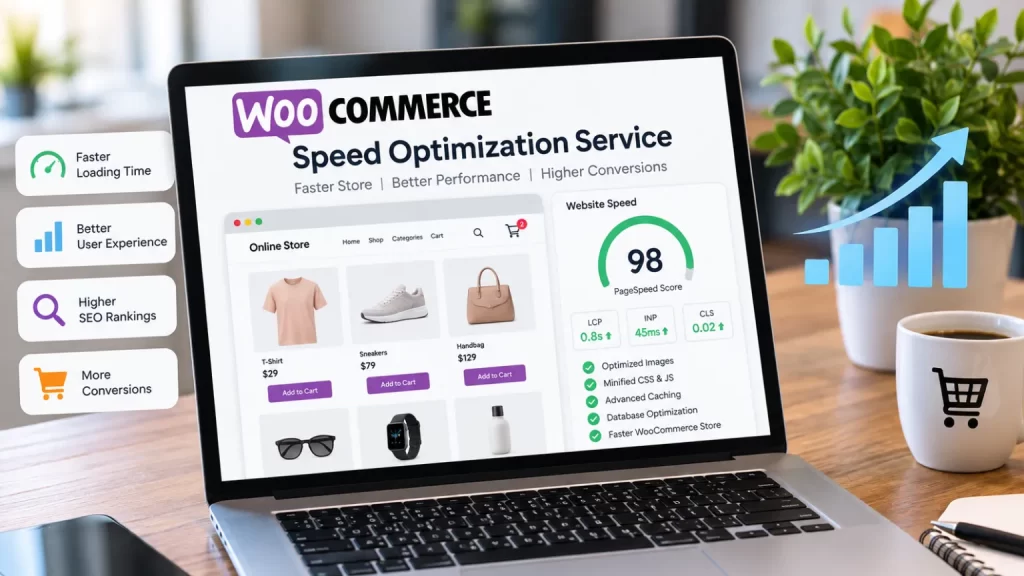
A WooCommerce speed optimization service helps online stores load faster, respond quickly and provide a better shopping experience. A slow WooCommerce website can affect product browsing, cart interactions, checkout and mobile usability. Customers may leave before completing a purchase when pages take too long to load. Speed optimization involves more than compressing images. It can include improving hosting, database queries, plugins, JavaScript, CSS, caching, images, product pages and WooCommerce functionality.
Table of Contents
A professional website development company like NJ Technos can analyze an existing WooCommerce website and identify the areas affecting its performance.
Why WooCommerce Website Speed Matters
WooCommerce stores often contain more dynamic functionality than a normal business website.
A typical store may have:
- Product images
- Product variations
- Filters
- Shopping cart
- Checkout
- Payment gateways
- Shipping calculations
- Customer accounts
- Reviews
- Analytics
- Marketing scripts
- Third-party plugins
All these components can affect loading performance.
A fast website makes it easier for customers to browse products, add items to their cart and complete checkout.
9 Powerful WooCommerce Speed Optimization Techniques
1. Optimize Product Images
Large product images are one of the most common causes of slow ecommerce pages.
WooCommerce stores often use multiple images for every product, including:
- Main product image
- Gallery images
- Thumbnail images
- Variation images
- Banner images
Images should be resized according to their actual display size and compressed without unnecessarily reducing quality.
Modern formats such as WebP can also reduce image file sizes.
For example, instead of uploading a 5 MB product image when the website only displays it at 800px wide, the image can be properly resized and optimized before delivery.
2. Improve WooCommerce Hosting
Hosting has a direct impact on website response time.
A WooCommerce store needs enough server resources to handle:
- Product queries
- Customer sessions
- Cart operations
- Checkout
- Database requests
- Admin activity
Shared hosting may be sufficient for a small store, but growing stores may require better infrastructure.
A faster server can reduce the time required to process dynamic WooCommerce requests.
3. Reduce Unnecessary Plugins
Plugins add functionality, but too many plugins can increase the amount of code and processing required by a website.
A WooCommerce speed optimization service should review installed plugins and identify:
- Unused plugins
- Duplicate functionality
- Poorly coded plugins
- Plugins loading unnecessary assets
- Plugins making excessive database requests
Removing an unnecessary plugin can sometimes improve performance without changing the website design.
However, plugins should not be removed blindly. Every plugin should first be checked for dependencies and functionality.
4. Optimize CSS and JavaScript
WooCommerce websites commonly load CSS and JavaScript from themes, plugins and third-party services.
Some scripts may not be required on every page.
For example, a checkout-specific script does not necessarily need to load on a blog article.
Optimization can include:
- Removing unused CSS
- Deferring non-critical JavaScript
- Minifying assets
- Loading scripts conditionally
- Reducing third-party scripts
- Combining assets where appropriate
- Delaying non-essential scripts
The exact approach depends on the website architecture.
5. Improve Caching
Caching allows frequently requested content to be served more efficiently.
Different types of caching can be used for different parts of a WooCommerce website.
These may include:
- Page caching
- Browser caching
- Object caching
- CDN caching
- Database caching
However, WooCommerce pages such as cart, checkout and account pages require special consideration because they contain dynamic information.
A caching strategy should therefore be configured specifically for WooCommerce rather than applying the same rules to every page.
6. Optimize the WooCommerce Database
WooCommerce websites can accumulate a large amount of database information over time.
This can include:
- Orders
- Product data
- Customer data
- Transients
- Plugin data
- Post revisions
- Metadata
Large databases can make queries slower when they are poorly structured or unnecessarily loaded.
Database optimization may involve cleaning unused data, improving queries and checking database indexes.
For large stores, database optimization can become an important part of a complete WooCommerce speed optimization service.
7. Use a Content Delivery Network
A CDN can deliver static files from servers closer to website visitors.
This can be useful when an ecommerce store has customers in different cities or countries.
Static resources such as:
- Images
- CSS
- JavaScript
- Fonts
can potentially be delivered more efficiently through a CDN.
The CDN configuration should be tested carefully so that dynamic WooCommerce functionality such as cart and checkout continues to work correctly.
8. Optimize WooCommerce Product Pages
Product pages are among the most important pages on an ecommerce website.
A product page may contain:
- Multiple images
- Product variations
- Reviews
- Related products
- Upsells
- Cross-sells
- Product tabs
- Recommendations
Too many elements can increase page weight.
A speed optimization process can identify which elements are necessary and which can be simplified.
The goal is to keep the product page visually useful without loading unnecessary resources.
9. Improve Mobile Performance
Mobile optimization is essential for WooCommerce stores.
A mobile visitor may be using a slower network or less powerful device than a desktop visitor.
Mobile optimization can include:
- Responsive images
- Smaller assets
- Lightweight layouts
- Optimized fonts
- Reduced animations
- Efficient JavaScript
- Faster product galleries
- Simplified checkout
Google provides guidance around page experience and performance through Google Search Central, which is useful when evaluating website performance and user experience.
Core Web Vitals for WooCommerce
Core Web Vitals are important performance metrics used to understand real-world page experience.
The main metrics include:
- LCP – Largest Contentful Paint
- INP – Interaction to Next Paint
- CLS – Cumulative Layout Shift
A WooCommerce speed optimization project should look at these metrics rather than focusing only on a single overall speed score.
For example, a website may have a good desktop score while still having problems on mobile.
WooCommerce Speed Optimization for Product Archives
Shop and category pages can become slow when they display many products.
A typical category page may contain:
- Product images
- Prices
- Ratings
- Add-to-cart buttons
- Filters
- Sorting
- Pagination
- Product badges
Optimization can include reducing unnecessary requests, properly sizing images and improving product queries.
Lazy loading can also prevent every image below the initial viewport from loading immediately.
Speed Optimization for WooCommerce Checkout
Checkout is especially important because it directly affects conversions.
A checkout page can load scripts from:
- WooCommerce
- Payment gateways
- Shipping systems
- Analytics
- Marketing tools
- Security tools
A WooCommerce speed optimization service should therefore check which scripts are actually needed on checkout.
The checkout should remain functional while unnecessary resources are reduced.
WooCommerce Speed and Plugins
Not every slow WooCommerce website has the same problem.
One store may have a heavy theme, while another may have a large number of plugins.
Another website may have slow database queries or poor hosting.
For this reason, speed optimization should begin with testing rather than randomly installing optimization plugins.
For stores requiring custom ecommerce functionality, custom WooCommerce plugin development can also help replace unsuitable plugin combinations with functionality designed around the store’s actual requirements.
WooCommerce Theme Optimization
The theme controls many elements loaded on the front end.
A heavy theme may load:
- Large CSS files
- Multiple JavaScript libraries
- Unused widgets
- Animation libraries
- Extra fonts
- Unnecessary page-builder assets
A speed audit can identify assets that are not required.
A lightweight and properly coded WooCommerce theme can make optimization easier.
Reduce Third-Party Scripts
Marketing and tracking tools are useful, but every third-party script can add additional requests and processing.
Examples include:
- Analytics
- Advertising pixels
- Chat widgets
- Social media scripts
- Heatmaps
- Review widgets
The website should only load the services that are actually needed.
Non-essential scripts can potentially be delayed until after the primary page content becomes usable.
WooCommerce Speed Optimization and SEO
Website performance is also relevant to SEO and user experience.
A fast website can provide a better experience for visitors navigating between product pages, categories and checkout.
However, speed should not be treated as the only SEO factor.
A complete ecommerce SEO strategy also requires:
- Useful product content
- Search-friendly URLs
- Proper internal linking
- Mobile usability
- Structured data
- Crawlable pages
- Good navigation
Google’s Search Essentials provides guidance on technical and content practices for websites appearing in Google Search.
How to Test WooCommerce Speed
Several tools can help identify performance issues.
You can test important pages such as:
- Homepage
- Shop page
- Category page
- Product page
- Cart
- Checkout
Testing should be performed on both desktop and mobile.
It is also useful to test the website before and after optimization.
The goal should not simply be to achieve a high score. The actual loading experience and important user interactions should also improve.
WooCommerce Speed Optimization Checklist
| Area | What to Check |
|---|---|
| Images | Size, compression and format |
| Hosting | Server response time |
| Plugins | Unused and inefficient plugins |
| CSS | Unused styles |
| JavaScript | Blocking and unnecessary scripts |
| Database | Queries and unnecessary data |
| Cache | Proper WooCommerce configuration |
| CDN | Static asset delivery |
| Product pages | Images and dynamic elements |
| Checkout | Unnecessary scripts |
| Mobile | Responsive performance |
| Core Web Vitals | LCP, INP and CLS |
Benefits of Professional WooCommerce Speed Optimization
A professional WooCommerce speed optimization service can help identify technical issues that may not be obvious from the front end.
The optimization process can focus on:
- Faster page loading
- Better mobile experience
- Lower server processing
- Improved product browsing
- Better checkout performance
- Cleaner website architecture
- Reduced unnecessary requests
- Better Core Web Vitals
The exact improvement depends on the existing website, hosting, theme, plugins and amount of optimization required.
How Much Does WooCommerce Speed Optimization Cost?
There is no fixed cost for every WooCommerce website.
A small store may only need image, caching and asset optimization.
A larger ecommerce website may require:
- Database optimization
- Plugin auditing
- Custom code optimization
- Server optimization
- CDN configuration
- WooCommerce query optimization
- Theme optimization
- Checkout optimization
The final cost should therefore be based on a performance audit and the actual problems found on the website.
Common WooCommerce Speed Problems
Some common problems include:
Large Images
Unoptimized product images can significantly increase page size.
Too Many Plugins
Multiple plugins can load unnecessary scripts and database queries.
Heavy Themes
Large themes can add CSS and JavaScript that are not required.
Poor Hosting
Slow servers can affect every dynamic WooCommerce request.
Unoptimized Database
Large or inefficient queries can increase server processing time.
Too Many Third-Party Scripts
Analytics, advertisements and widgets can increase browser processing.
Poor Mobile Optimization
A website that works well on desktop may still be slow on mobile.
Why Choose a WooCommerce Speed Optimization Service?
Professional optimization is useful when a website has already been built but performance remains poor.
Instead of changing the entire store, developers can first identify the main bottlenecks and optimize the areas that have the biggest impact.
This approach can help preserve the existing:
- Products
- Orders
- Customers
- Design
- Checkout
- WooCommerce functionality
while improving the underlying performance.
Frequently Asked Questions
What is a WooCommerce speed optimization service?
It is a professional service focused on identifying and improving performance problems in WooCommerce websites.
Why is my WooCommerce website slow?
Common causes include large images, heavy themes, too many plugins, slow hosting, database issues, excessive JavaScript and third-party scripts.
Can WooCommerce speed be improved without changing the design?
Yes. Many performance improvements can be made without completely redesigning the website.
Does image optimization improve WooCommerce speed?
Yes. Properly resizing and compressing product images can reduce page size and loading time.
Can plugins make WooCommerce slow?
Yes. Some plugins can add significant CSS, JavaScript, database queries or third-party requests.
Should I remove WooCommerce plugins?
Only unnecessary or problematic plugins should be considered for removal. Plugins that provide essential functionality should remain after performance testing.
Can Core Web Vitals be improved?
Yes. Optimization can target metrics such as LCP, INP and CLS, although the exact results depend on the website.
Can mobile WooCommerce speed be improved?
Yes. Image optimization, efficient JavaScript, responsive layouts, caching and reducing unnecessary resources can help improve mobile performance.
Can an existing WooCommerce store be optimized?
Yes. A speed optimization service can work with an existing store after reviewing its theme, plugins, hosting, database and front-end assets.
Final Thoughts
A WooCommerce speed optimization service can help ecommerce businesses improve the performance of their online stores without rebuilding everything from scratch.
From image optimization and caching to database improvements, plugin auditing, JavaScript optimization, CDN configuration and mobile performance, multiple areas can contribute to a faster WooCommerce website.
The most effective approach is to test the website first, identify the biggest performance problems and then optimize those areas systematically.
For a growing ecommerce store, better performance can also make everyday activities such as browsing products, adding items to the cart and completing checkout smoother for customers.