A WordPress to WooCommerce migration service helps businesses transform an existing WordPress website into a fully functional ecommerce store. A normal WordPress website may already have pages, blog posts, users and media files, but selling products requires additional ecommerce functionality. WooCommerce adds features such as products, shopping carts, checkout, payments, orders and customer accounts.
Table of Contents
A properly planned migration can help preserve important website content while adding the ecommerce functionality required for online selling.
Businesses planning a complete migration or redesign can also work with NJ Technos for WordPress and WooCommerce development.
What Is WordPress to WooCommerce Migration?
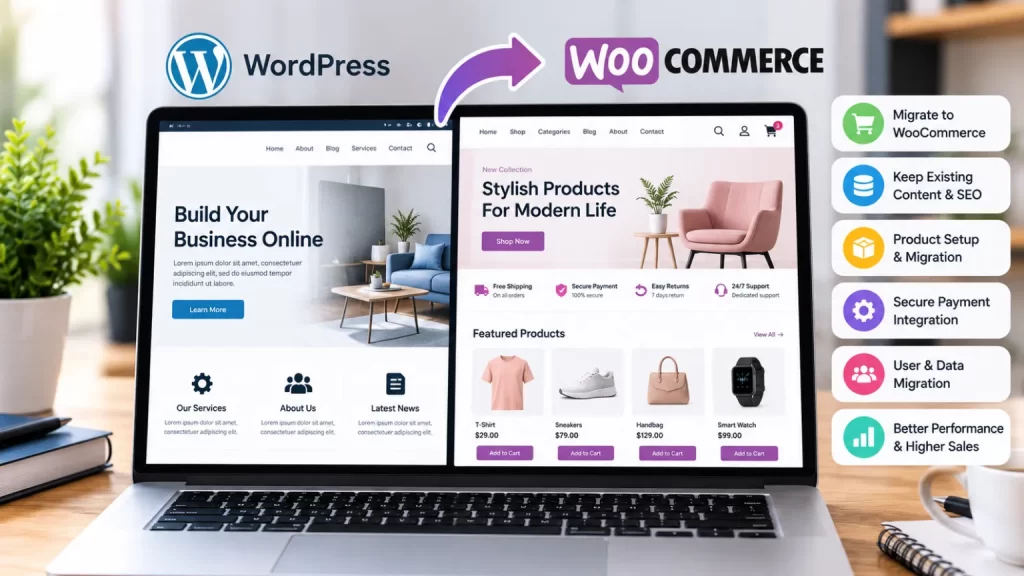
WordPress and WooCommerce work together, so migration usually means converting an existing WordPress website into a WooCommerce-powered ecommerce website.
The migration may involve:
- Existing website pages
- Blog posts
- Images
- Users
- Categories
- Existing URLs
- Product information
- Customer information
- Website design
- SEO metadata
WooCommerce can then add:
- Products
- Shopping cart
- Checkout
- Payment gateways
- Shipping
- Orders
- Customer accounts
- Product variations
- Coupons
- Inventory management
The official WooCommerce documentation provides detailed information about WooCommerce products, orders, payments and store management.
9 Powerful Benefits of WordPress to WooCommerce Migration
1. Turn Your Website Into an Online Store
The main reason businesses choose a WordPress to WooCommerce migration service is to start selling products online.
WooCommerce allows businesses to add:
- Physical products
- Digital products
- Variable products
- Subscription products
- Downloadable products
- Product bundles
This makes it possible to turn an existing business website into a complete ecommerce platform.
2. Keep Your Existing WordPress Content
Migration does not necessarily mean starting from zero.
Important website content such as:
- Pages
- Blog posts
- Images
- Categories
- Users
- SEO content
can be retained and integrated into the new ecommerce website.
This is particularly important for businesses that already have search traffic and valuable website content.
3. Add Secure Online Payments
WooCommerce supports multiple payment options through extensions and payment gateway integrations.
Depending on the business and location, customers can potentially pay using:
- Credit cards
- Debit cards
- UPI
- Net banking
- Digital wallets
- Payment gateways
The payment setup should be tested carefully before the new store goes live.
4. Manage Products Easily
WooCommerce provides a structured product management system.
Administrators can manage:
- Product names
- Descriptions
- Prices
- Images
- Stock
- Categories
- Attributes
- Variations
- SKUs
For stores with many products, this makes ecommerce management much easier than maintaining product information manually on standard WordPress pages.
5. Add Shopping Cart and Checkout
A normal WordPress website does not provide a complete ecommerce checkout by default.
WooCommerce adds the necessary purchasing workflow:
Product → Add to Cart → Cart → Checkout → Payment → Order
The checkout can also be customized according to business requirements.
For example, stores may need additional fields for GST information, delivery instructions, business details or custom order requirements.
6. Manage Orders From One Dashboard
WooCommerce provides centralized order management.
Administrators can view:
- New orders
- Processing orders
- Completed orders
- Cancelled orders
- Refunded orders
- Customer information
- Payment details
- Shipping information
This provides a structured way to manage ecommerce operations.
7. Improve Ecommerce Scalability
A WordPress website that starts as an informational website may eventually need ecommerce functionality.
WooCommerce allows businesses to expand gradually.
For example:
Business Website → Product Catalog → Online Store → Advanced Ecommerce → Custom Integrations
Additional features can be added as the business grows.
8. Customize the Store Design
Migration does not mean the website has to look like a standard WooCommerce template.
The existing branding can be maintained while creating custom:
- Homepage
- Product pages
- Shop page
- Category pages
- Cart
- Checkout
- Customer dashboard
A custom WooCommerce design can make the store more consistent with the existing brand identity.
9. Connect Additional Business Tools
A WooCommerce store can be integrated with other systems when required.
Possible integrations include:
- CRM
- ERP
- Shipping platforms
- Accounting software
- Inventory systems
- Email marketing
- Payment gateways
- Third-party APIs
This can reduce manual data entry and connect ecommerce operations with other parts of the business.
What Is Migrated From WordPress?
A professional WordPress to WooCommerce migration service should first identify which existing website data needs to be retained.
Common migration elements include:
| Existing WordPress Data | Migration Requirement |
|---|---|
| Pages | Preserve |
| Blog posts | Preserve |
| Images | Preserve |
| Categories | Review |
| Users | Preserve where required |
| URLs | Map carefully |
| SEO metadata | Preserve |
| Existing design | Redesign/retain |
| Products | Create/import |
| Ecommerce data | Configure |
The exact migration requirements depend on the existing website.
WordPress to WooCommerce Migration Process
Step 1: Website Audit
The existing WordPress website should first be reviewed.
The audit can include:
- Pages
- URLs
- Plugins
- Theme
- Database
- Media
- Users
- SEO
- Existing functionality
Step 2: Ecommerce Planning
The required ecommerce functionality is documented.
This can include:
- Product types
- Payment methods
- Shipping
- Tax
- Checkout
- Customer accounts
- Product categories
Step 3: WooCommerce Setup
WooCommerce is configured according to the store requirements.
Step 4: Product Structure
Products, categories, attributes and variations are created or migrated.
Step 5: Design and Development
The existing design can be adapted into an ecommerce-friendly interface.
Step 6: Data Migration
Required pages, posts, users, images and other information are migrated.
Step 7: Testing
The website should be tested across:
- Product pages
- Cart
- Checkout
- Payments
- Customer accounts
- Mobile devices
- Emails
Step 8: SEO and URL Checks
Important URLs should be checked before launch.
If URLs change, appropriate redirects should be implemented to help users and search engines reach the correct new pages.
Step 9: Launch
After testing and final backups, the new WooCommerce website can be launched.
Product Migration
If the existing WordPress website already contains product information in custom post types or other structures, that information may need to be converted into WooCommerce products.
Product information can include:
- Product name
- Description
- Price
- SKU
- Images
- Categories
- Attributes
- Variations
- Stock information
For large product catalogs, bulk import or custom migration scripts can make the process more efficient.
SEO During WordPress to WooCommerce Migration
SEO should be considered before migration rather than after the new website is launched.
Important areas include:
- Existing URLs
- Page titles
- Meta descriptions
- Canonical URLs
- Internal links
- Product URLs
- Category URLs
- XML sitemap
- Redirects
- Image URLs
Google’s Search Central documentation provides guidance on maintaining search-friendly website structures.
A URL change without proper redirects can cause unnecessary problems, especially when the old website already receives organic traffic.
Mobile-Friendly WooCommerce Migration
The new ecommerce website should work properly on smartphones and tablets.
Important areas include:
- Product browsing
- Product images
- Add-to-cart buttons
- Filters
- Cart
- Checkout
- Payment forms
A mobile customer should be able to complete the purchase without unnecessary scrolling or difficult form interactions.
Website Speed After Migration
Adding WooCommerce introduces additional functionality, so performance should be considered during development.
The new store should be optimized for:
- Product images
- CSS
- JavaScript
- Database queries
- Caching
- Hosting
- Third-party scripts
For stores requiring additional performance work, a dedicated WooCommerce speed optimization service can be used after migration.
Security During Migration
A migration should include appropriate security precautions.
Before moving the website, maintain a complete backup of:
- Database
- WordPress files
- Media
- Theme
- Plugins
The new WooCommerce website should also use:
- HTTPS
- Secure administrator accounts
- Updated WordPress
- Updated WooCommerce
- Trusted plugins
- Appropriate user permissions
Payment information should be handled through properly configured payment gateways rather than stored unnecessarily on the website.
Common WordPress to WooCommerce Migration Mistakes
Changing URLs Without Redirects
Old URLs should be mapped to their new locations when URLs change.
Forgetting Existing SEO Content
Important pages and blog posts should not be accidentally removed during migration.
Ignoring Product Variations
Products with sizes, colors or other variations require proper WooCommerce configuration.
Not Testing Checkout
The complete checkout process should be tested before launch.
Forgetting Mobile Testing
The new store should be tested on multiple screen sizes.
Migrating Without a Backup
Always maintain a reliable backup before major migration work.
Installing Too Many Plugins
Only required plugins should be used to reduce unnecessary complexity.
WordPress Website vs WooCommerce Store
| Feature | WordPress Website | WooCommerce Store |
|---|---|---|
| Business pages | Yes | Yes |
| Blog | Yes | Yes |
| Products | Limited/custom | Yes |
| Shopping cart | No by default | Yes |
| Checkout | No by default | Yes |
| Online payments | Custom | Supported |
| Orders | Custom | Yes |
| Inventory | Custom | Yes |
| Customer accounts | Basic/custom | Ecommerce-focused |
| Coupons | Custom | Yes |
How Much Does WordPress to WooCommerce Migration Cost?
The cost depends on the size and complexity of the existing website.
A simple migration may include:
- WooCommerce installation
- Basic product setup
- Payment gateway
- Shipping configuration
- Design adjustments
A larger migration may require:
- Hundreds or thousands of products
- Custom product fields
- Existing user migration
- Custom checkout
- API integrations
- SEO migration
- Custom theme development
- Database migration
- Third-party integrations
The final cost should therefore be based on the existing website and required ecommerce functionality.
Why Choose a Professional Migration Service?
A professional WordPress to WooCommerce migration service can handle both the technical migration and ecommerce setup.
This can include:
- Website audit
- Data migration
- WooCommerce setup
- Product migration
- Design conversion
- Payment configuration
- Shipping setup
- SEO preservation
- Mobile optimization
- Testing
- Launch support
This approach helps reduce the risk of losing important website content or ecommerce functionality during the transition.
Frequently Asked Questions
Can I convert my existing WordPress website into a WooCommerce store?
Yes. WooCommerce can be added to an existing WordPress website and configured to provide ecommerce functionality.
Will my existing WordPress pages be deleted?
They do not have to be. Existing pages and content can be retained during a properly planned migration.
Can existing blog posts be preserved?
Yes. Blog posts can remain part of the new WooCommerce website.
Can existing users be migrated?
Yes, depending on the existing user structure and migration requirements.
Can I migrate existing products?
Yes. Product data can be imported or converted into WooCommerce products.
Will my SEO rankings be affected?
A migration can affect SEO if URLs, content or technical settings change incorrectly. Proper URL mapping, redirects and SEO checks can reduce migration-related issues.
Can WooCommerce be customized after migration?
Yes. WooCommerce can be extended with custom themes, plugins and integrations.
Can payment gateways be added?
Yes. Payment gateways can be configured according to the business’s location and payment requirements.
Can my existing design be retained?
Yes. The existing branding and design can be retained or redesigned into a more ecommerce-focused layout.
Final Thoughts
A WordPress to WooCommerce migration service can help businesses turn an existing WordPress website into a complete online store while retaining important website content.
With WooCommerce, businesses can add products, shopping carts, checkout, payments, order management, inventory and customer accounts.
A successful migration should not focus only on installing WooCommerce. It should also consider data, URLs, SEO, design, performance, security, mobile usability and future scalability.
With proper planning and testing, an existing WordPress website can be transformed into a flexible WooCommerce store ready for online sales.