A WordPress Core Web Vitals optimization service measures your site’s real-user performance, finds what is slowing it down, and fixes the causes of poor LCP, INP and CLS scores, usually across hosting, caching, images, scripts, fonts and layout. It improves the experience your visitors actually have, and it works best alongside regular maintenance. No honest provider can promise a perfect score or a ranking jump.
Many WordPress sites fail Core Web Vitals for the same reasons: heavy themes, too many plugins, unoptimised images, third-party scripts and layouts that jump around while loading. This guide covers what the metrics mean, who needs a WordPress Core Web Vitals optimization service, what the work includes, 7 checks to choose a provider, how projects are phased, and why NJ Technos can help.
Table of Contents
What are Core Web Vitals?
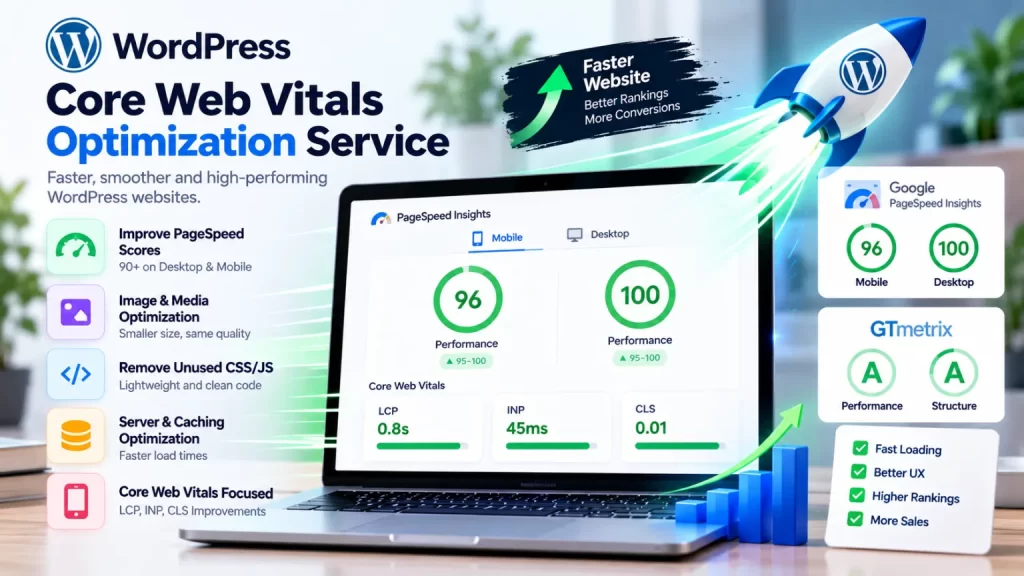
Core Web Vitals are three field metrics that measure real-world user experience. Google’s web.dev guide to the Core Web Vitals thresholds names them as Largest Contentful Paint (LCP), Interaction to Next Paint (INP) and Cumulative Layout Shift (CLS). INP replaced First Input Delay as a Core Web Vital in March 2024.
| Metric | What it measures | Good score |
|---|---|---|
| LCP (Largest Contentful Paint) | How fast the main content loads | 2.5 seconds or less |
| INP (Interaction to Next Paint) | How quickly the page responds to clicks, taps and key presses | 200 milliseconds or less |
| CLS (Cumulative Layout Shift) | How much the layout jumps while loading | 0.1 or less |
These scores are judged at the 75th percentile of real visitors, so a fast result on your own laptop doesn’t mean your site passes. Core Web Vitals are also only one part of Google’s page experience signals, so treat them as a way to improve user experience, not a ranking trick.
Who needs a WordPress Core Web Vitals optimization service?
| Who | What they typically need |
|---|---|
| Business and company websites | Faster pages and better mobile experience for lead generation |
| WooCommerce stores | Faster product pages, cart and checkout |
| Sites built with heavy page builders | Lighter templates and fewer scripts |
| Sites with many plugins | A plugin audit and removal of unnecessary scripts |
| Sites failing Search Console’s Core Web Vitals report | A diagnosis of which pages and metrics fail |
| Sites with ads, chat widgets or tracking tags | Control over third-party script impact |
| Agencies and freelancers | A repeatable performance process for client sites |
If you run an online store, see our guide on WooCommerce speed optimization service, because carts, checkout and product filters need extra attention.
What does a WordPress Core Web Vitals optimization service include?
A thorough WordPress Core Web Vitals optimization service works metric by metric, after measuring both field data and lab tests:
| Area | Typical fixes |
|---|---|
| Measurement | PageSpeed Insights, Search Console’s Core Web Vitals report and Chrome DevTools to find failing pages and causes |
| LCP | Optimise the hero image, avoid lazy-loading the main image, reduce render-blocking CSS and JavaScript, improve server response time and caching |
| INP | Cut heavy JavaScript, defer or delay non-essential scripts, remove plugins that add slow interactions, simplify complex page-builder widgets |
| CLS | Set width and height on images and embeds, reserve space for banners and ads, fix font loading, avoid content injected above existing content |
| Hosting and server | Check server response time, PHP version, caching layers and CDN use |
| Images and media | Compress, resize and serve modern formats, and load below-the-fold media later |
| Theme and plugins | Audit what loads on each page and remove or replace heavy items |
| Database and caching | Clean up bloat and configure page and object caching sensibly |
| Mobile checks | Test on real phones and slower connections, not only on desktop |
| Reporting | Share before and after results and what is still left to improve |
Some sites reach good scores with settings and image fixes. Others need theme-level changes, such as an Elementor to custom theme conversion, when the page builder itself is the bottleneck.
Important: always back up and test on a staging copy first. Caching and script changes can break forms, menus and checkout if they are rushed.
How do you choose a WordPress Core Web Vitals optimization service? 7 checks
These 7 checks help you shortlist the right WordPress Core Web Vitals optimization service.
1. Ask how they measure, not only what they fix
A good provider looks at real-user field data as well as lab tests. A single PageSpeed score on a desktop test isn’t enough.
2. Ask for a written audit and scope
You should know which pages, metrics and problems are covered before work starts.
3. Check they understand your theme, builder and plugins
Fixing LCP on a custom theme is different from fixing INP on a page builder with many add-ons. Ask how they handle your setup.
4. Be wary of “100/100” and ranking promises
Scores vary by device, location and content, and Core Web Vitals are one of many signals. A trustworthy provider promises improvement and clear reporting, not perfect numbers or guaranteed rankings.
5. Confirm they test on staging and back up first
Optimisation changes how scripts and styles load. Ask how they protect forms, checkout and tracking while they work.
6. Make sure you keep control
Your hosting, CDN, plugin licences and admin access should stay in your name, with documentation of what was changed.
7. Plan ongoing monitoring
New plugins, banners and tracking scripts can undo good results. Ask about monitoring and a maintenance plan, such as a website maintenance AMC, with response times in writing.
How is an optimization project phased, and what affects cost?
Most projects with a WordPress Core Web Vitals optimization service follow these phases:
| Phase | What happens |
|---|---|
| 1. Audit | Review field data, lab tests, theme, plugins, hosting and failing templates |
| 2. Backup and staging | Take a full backup and create a staging copy |
| 3. Quick wins | Fix images, caching, fonts and obvious script problems |
| 4. Deep fixes | Address JavaScript, layout shifts, theme issues and server response |
| 5. Testing | Check forms, menus, checkout and mobile behaviour |
| 6. Go live and report | Deploy changes and share before and after results |
| 7. Monitor | Re-check as new field data comes in and as the site changes |
Field data is collected over time, so Search Console and similar reports can take weeks to reflect improvements. That is normal.
What affects cost: the number of templates and pages, the theme and page builder used, how many plugins and third-party scripts the site has, hosting quality, WooCommerce complexity, whether theme changes are needed, and the level of ongoing monitoring. Ask for a quote after an audit.
Why choose NJ Technos for WordPress Core Web Vitals optimization?
NJ Technos is a Delhi-based web design and development company, working since 2006 and with 500+ websites built. As a WordPress Core Web Vitals optimization service provider, we bring:
- WordPress development depth. We build custom themes and plugins, so we can fix the cause in code instead of only stacking optimisation plugins.
- A careful process. Backup first, test on staging, then deploy, so your live site keeps working.
- Theme-level options. When a page builder is the problem, we can move you to a lighter build. See our guides on Figma to WordPress conversion service India and headless WordPress development India.
- Security alongside speed. Read our WordPress security hardening service guide, since caching and plugin changes should never weaken your site.
- Support after delivery. Website maintenance and support is one of our services.
See all our services.
Is your WordPress site failing Core Web Vitals?
Tell us your website, the pages that feel slow and your current hosting, and we’ll review it and recommend a clear plan and quote. Reach us through our contact page, email info@njtechnos.com or call +91 783 830 0319.
FAQs: WordPress Core Web Vitals optimization service
Add these with the Rank Math FAQ block so FAQPage schema is generated.
What does a WordPress Core Web Vitals optimization service do?
It measures your real-user LCP, INP and CLS, finds the causes of poor scores and fixes them across hosting, caching, images, scripts, fonts and layout.
What are good Core Web Vitals scores?
Good scores are LCP of 2.5 seconds or less, INP of 200 milliseconds or less and CLS of 0.1 or less, measured at the 75th percentile of real visitors.
Will Core Web Vitals optimization improve my Google rankings?
It can help your visitors, and page experience is one of many signals Google considers. No provider can guarantee a ranking increase from optimization alone.
Can a caching plugin fix Core Web Vitals on its own?
Sometimes it fixes part of the problem, mainly loading speed. Heavy JavaScript, layout shifts and slow servers often need separate fixes.
How long until Search Console shows improvement?
It depends on your traffic. Field data builds up over time, so improvements can take weeks to appear in reports.
How long does optimization take?
It depends on the site’s size, theme and number of problem templates. Ask for a timeline after the audit.
Do you work with clients outside Delhi?
Yes. NJ Technos is based in Delhi and works with clients across India.
Final verdict: WordPress Core Web Vitals optimization service
A good WordPress Core Web Vitals optimization service starts with measurement, fixes the real causes of poor LCP, INP and CLS, tests safely on staging and reports honestly on the results. Choose a provider who understands your theme and plugins, avoids perfect-score promises, lets you keep control and offers ongoing monitoring.
If you need a WordPress Core Web Vitals optimization service businesses in India can rely on, NJ Technos has been building and supporting WordPress websites since 2006.
Let’s speed up your site
Share your website and the pages that feel slow, and we’ll recommend a clear plan. Contact us through our contact page.