WooCommerce abandoned cart recovery setup helps online stores reconnect with customers who add products to their cart but leave without completing their purchase. Cart abandonment is common in ecommerce. A customer may become distracted, compare prices, experience unexpected shipping costs, have difficulty with checkout or simply decide to complete the purchase later.
Table of Contents
A properly configured recovery system can send timely reminders through email, WhatsApp, SMS or other supported channels and bring customers back to their unfinished orders.
For businesses that need customized WooCommerce functionality, NJ Technos can help configure or develop ecommerce solutions based on the store’s requirements.
A properly planned WooCommerce abandoned cart recovery setup can help stores reconnect with customers without making the recovery process intrusive.
The right WooCommerce abandoned cart recovery setup should combine useful reminders, direct cart links and clear calls to action.
For stores with a large customer base, a customized WooCommerce abandoned cart recovery setup can support different recovery campaigns for different customer groups.
A professional WooCommerce abandoned cart recovery setup can also provide reports that show which recovery campaigns generate completed orders.
Before launching a WooCommerce abandoned cart recovery setup, businesses should test the complete customer journey from abandoned cart detection to successful checkout.
What Is WooCommerce Abandoned Cart Recovery?
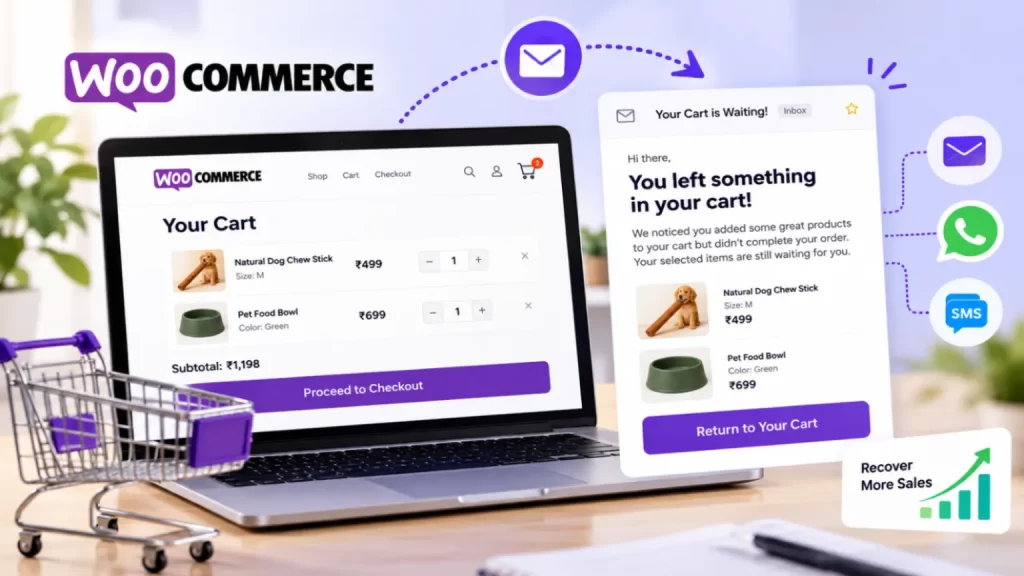
WooCommerce abandoned cart recovery is a system that identifies carts where customers have added products but have not completed checkout.
The system can record relevant cart information and trigger recovery messages according to predefined rules.
A typical workflow looks like:
Product Added → Cart Created → Customer Leaves → Recovery Reminder → Customer Returns → Order Completed
The goal is not to repeatedly contact every visitor. Instead, the system should use appropriate timing and messaging to give customers an opportunity to complete a purchase they previously started.
9 Powerful WooCommerce Abandoned Cart Recovery Strategies
1. Send the First Reminder at the Right Time
Timing is important in a WooCommerce abandoned cart recovery setup.
A reminder sent immediately may feel unnecessary, while waiting too long can mean the customer has already moved on.
A store can test different intervals, such as:
- 30 minutes
- 1 hour
- 3 hours
- 24 hours
The ideal timing depends on the product, customer journey and purchase decision.
2. Use Personalized Cart Recovery Emails
A generic email may not be as useful as a message that clearly reminds the customer what they left behind.
A recovery email can include:
- Customer name
- Product name
- Product image
- Product price
- Cart contents
- Checkout button
For example:
Your cart is waiting
You added these products to your cart but didn’t complete your order.
Continue Shopping
The message should remain simple and focused on helping the customer return to checkout.
3. Include a Direct Recovery Link
The recovery message should make returning to the cart easy.
Instead of asking customers to visit the website and search for their products again, the email can include a direct recovery link.
The workflow becomes:
Reminder → Recovery Link → Cart → Checkout
Fewer steps can make the recovery process more convenient.
4. Create Multiple Recovery Messages
One reminder may not be enough.
A store can create a sequence such as:
| Time | Message |
|---|---|
| 1 Hour | Cart reminder |
| 6 Hours | Product reminder |
| 24 Hours | Final reminder |
Each message should provide a different reason for returning rather than repeating exactly the same content.
The number of reminders should be appropriate for the brand and customer experience.
5. Offer Discounts Carefully
Some stores use discounts as part of their recovery strategy.
For example:
Complete your order today and receive 10% off.
Discounts can be useful for price-sensitive customers, but they should not necessarily be included in every recovery message.
If customers learn that abandoning their carts always results in a discount, they may intentionally wait for the offer.
A better approach is to test whether discounts actually improve completed orders and profitability.
6. Recover Carts With Email Automation
Email automation can reduce manual follow-up.
Once the recovery rules are configured, the system can automatically send messages when the required conditions are met.
A typical setup can include:
Abandoned Cart Detected → Wait → Email 1 → Wait → Email 2 → Final Reminder
The administrator can manage message templates, timing and campaign rules from the ecommerce system.
7. Use Mobile-Friendly Recovery Messages
Many customers access ecommerce websites through smartphones.
Recovery emails and messages should therefore work properly on mobile devices.
Important elements include:
- Clear product images
- Readable text
- Large CTA button
- Simple layout
- Fast-loading images
- Easy checkout access
A customer should be able to open the reminder and return to checkout without struggling with the interface.
8. Track Recovery Performance
A WooCommerce abandoned cart recovery setup should be measured.
Useful metrics include:
- Abandoned carts
- Recovery emails sent
- Emails opened
- Recovery link clicks
- Recovered carts
- Completed orders
- Recovery revenue
- Conversion rate
For example:
| Metric | Example |
|---|---|
| Abandoned Carts | 500 |
| Recovery Emails | 450 |
| Link Clicks | 120 |
| Recovered Orders | 48 |
| Recovery Revenue | ₹85,000 |
These numbers can help determine whether the recovery campaign is actually contributing to sales.
9. Test and Optimize the Recovery Campaign
Different customers respond differently to messaging and timing.
Stores can test:
- Subject lines
- Email timing
- Product images
- CTA wording
- Discounts
- Number of reminders
- Recovery page design
For example:
Subject A: You left something in your cart
Subject B: Your selected products are waiting
The better-performing version can then be used for future campaigns.
How Does WooCommerce Abandoned Cart Recovery Work?
The basic process is straightforward.
Step 1: Customer Adds Product
The customer adds one or more products to the cart.
Step 2: Customer Leaves
The customer exits the website without completing checkout.
Step 3: Cart Is Identified
The recovery system determines whether the cart qualifies as abandoned.
Step 4: Recovery Automation Starts
After the configured waiting period, the first recovery message is sent.
Step 5: Customer Returns
The customer clicks the recovery link and returns to the cart.
Step 6: Purchase Is Completed
If the customer completes checkout, the cart is marked as recovered and further reminders should stop.
Guest Cart vs Logged-In Customer
One important consideration in WooCommerce abandoned cart recovery setup is identifying customers.
Logged-in customers are easier to associate with an account.
Guest customers may require different handling depending on when their contact information becomes available and what communication permissions apply.
The recovery strategy should therefore distinguish between:
- Logged-in customers
- Returning customers
- Guest customers
- Customers who provided their email during checkout
Privacy and applicable communication requirements should also be considered.
Email Recovery for WooCommerce
Email is one of the most common channels for cart recovery.
A good recovery email can contain:
Subject: Your cart is still waiting
Message:
You selected these products but didn’t finish your order.
Review your cart and continue checkout whenever you’re ready.
[Return to My Cart]
The design can include the store logo, product images and a clear CTA.
WhatsApp Cart Recovery
Businesses may also consider WhatsApp-based recovery where appropriate and supported by their messaging setup.
A WhatsApp message could contain a short reminder and a link back to the customer’s cart.
Because messaging channels have different consent and platform requirements, businesses should configure them according to the applicable rules and provider policies.
SMS Cart Recovery
SMS can also be used for short reminders.
For example:
Your cart is waiting. Complete your order here: [checkout link]
SMS messages should remain concise and should only be sent where the customer has appropriate permission and the business has a compliant messaging setup.
Coupon-Based Cart Recovery
Coupons can be integrated into recovery campaigns.
For example:
Use code COMEBACK10 for 10% off your unfinished order.
The coupon can have restrictions such as:
- Expiry time
- Minimum order value
- Selected products
- Single use
- Customer-specific usage
This helps prevent discounts from being used unnecessarily.
Abandoned Cart Recovery for High-Value Products
High-value products often require more consideration before purchase.
A recovery campaign can focus on useful information rather than immediately offering a discount.
For example, a reminder could highlight:
- Product benefits
- Warranty
- Reviews
- Shipping information
- Returns
- Support
This can help answer questions that may have prevented the customer from completing checkout.
Abandoned Cart Recovery for WooCommerce Subscriptions
Subscription businesses may have different recovery requirements.
A customer might abandon a subscription because of:
- Pricing
- Payment concerns
- Product selection
- Delivery frequency
- Checkout issues
Recovery messaging can address the specific subscription journey instead of using the same message as a regular product store.
WooCommerce Abandoned Cart Recovery and Checkout Optimization
Cart recovery should not replace checkout optimization.
If many customers abandon their carts because checkout is confusing, sending more emails only addresses the symptom.
The checkout should be reviewed for:
- Unexpected costs
- Complicated forms
- Payment failures
- Slow loading
- Missing payment options
- Delivery issues
- Account requirements
Improving the checkout experience can reduce abandonment before recovery messages are even needed.
Custom WooCommerce Abandoned Cart Development
Some businesses need recovery functionality that is not available in their existing setup.
Custom development can support requirements such as:
- Custom recovery rules
- Customer-specific campaigns
- Advanced reporting
- Custom dashboards
- Multiple recovery channels
- CRM integration
- Coupon automation
- Custom checkout recovery
For advanced WooCommerce functionality, custom WooCommerce plugin development can be used to create features around the store’s specific workflow.
Abandoned Cart Recovery Dashboard
An administrator dashboard can provide an overview of recovery activity.
It can display:
- Total abandoned carts
- Recovered carts
- Recovery rate
- Recovery revenue
- Pending campaigns
- Emails sent
- Email clicks
- Completed purchases
This allows store owners to understand whether their recovery strategy is working.
Abandoned Cart Recovery vs Retargeting
These strategies are related but different.
| Cart Recovery | Retargeting |
|---|---|
| Focuses on abandoned carts | Can target broader visitors |
| Usually uses customer/cart information | Uses advertising audiences |
| Direct recovery messages | Paid advertisements |
| Designed to return customers to checkout | Can promote products or brand |
| Often automated | Usually campaign-based |
A business can use both strategies as part of a broader ecommerce marketing plan.
Common WooCommerce Cart Recovery Mistakes
Sending Too Many Messages
Repeated reminders can frustrate customers.
Giving Discounts Every Time
Constant discounts can reduce margins and train customers to wait.
Poor Recovery Links
Customers should be taken directly back to the relevant cart or checkout whenever technically possible.
Ignoring Mobile Users
Recovery messages should be easy to use on smartphones.
No Tracking
Without tracking, it is difficult to understand whether the campaign generates additional sales.
Ignoring Checkout Problems
If checkout itself is causing abandonment, recovery emails alone will not solve the underlying issue.
How Much Does WooCommerce Abandoned Cart Recovery Setup Cost?
The cost depends on the required recovery system.
A basic setup may include:
- Abandoned cart tracking
- Email reminders
- Recovery links
- Basic reporting
A more advanced setup may include:
- Multiple automation sequences
- SMS
- Coupon automation
- CRM integration
- Custom dashboards
- Advanced analytics
- Custom recovery rules
The final cost depends on the WooCommerce store, communication channels and required automation.
How to Choose a WooCommerce Abandoned Cart Recovery Service
Before implementing a recovery system, check whether the solution supports:
- WooCommerce
- Cart tracking
- Email automation
- Recovery links
- Customer segmentation
- Analytics
- Coupon rules
- Mobile-friendly templates
- Integration requirements
It is also important to test the complete workflow before sending automated messages to real customers.
Frequently Asked Questions
What is WooCommerce abandoned cart recovery setup?
It is the process of configuring a WooCommerce store to identify abandoned carts and automatically send appropriate recovery messages to eligible customers.
How does abandoned cart recovery work?
The system identifies an unfinished cart, waits for a configured period and sends a recovery message containing a link that allows the customer to return to the purchase journey.
Can abandoned carts be recovered through email?
Yes. Email is one of the most common channels used for abandoned cart recovery.
Can discounts be included?
Yes. Recovery campaigns can include coupons when appropriate.
Can WhatsApp be used for cart recovery?
It can be used where the business has an appropriate messaging setup and customer permissions.
Can guest carts be recovered?
It depends on when and how the customer’s contact information becomes available and on the recovery system being used.
Can recovery performance be tracked?
Yes. A recovery system can track metrics such as sent messages, clicks, recovered carts and revenue.
Can custom recovery rules be developed?
Yes. Custom WooCommerce development can create recovery workflows based on specific business requirements.
Final Thoughts
WooCommerce abandoned cart recovery setup can help ecommerce businesses reconnect with customers who leave without completing their purchases.
A well-planned system can combine timely reminders, direct recovery links, personalized messages, optional discounts and performance tracking.
The most effective setup should also address the reasons customers abandon carts in the first place. A smooth checkout, clear pricing, mobile-friendly design and reliable payment process can work alongside recovery automation to create a better ecommerce experience.
WooCommerce provides official documentation for managing products, orders, checkout and ecommerce functionality through its official documentation.