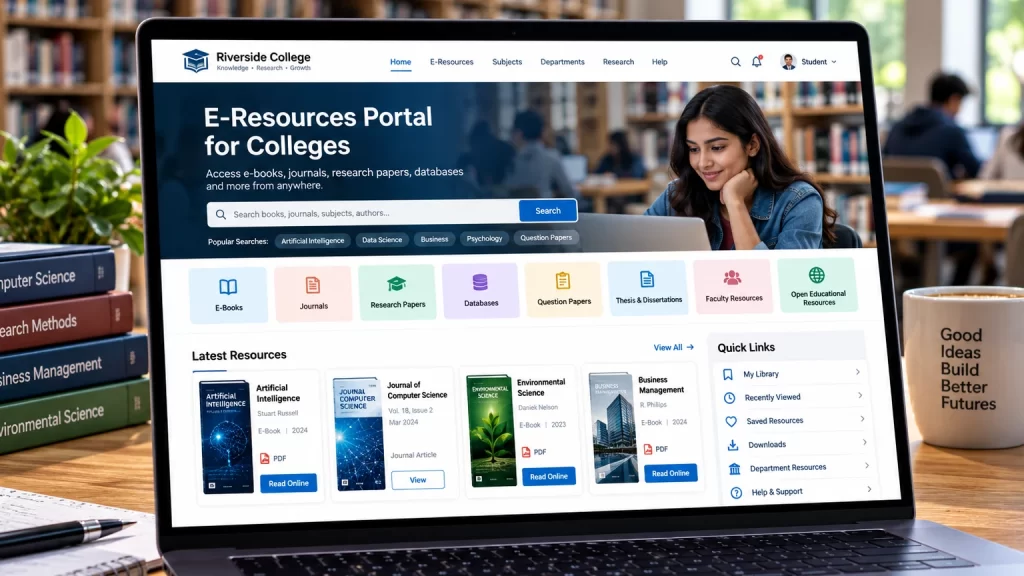
Colleges increasingly need digital platforms that allow students and faculty to access academic resources from anywhere. Professional e-resources portal development for colleges can create a centralized digital environment for ebooks, journals, research papers, databases, study materials, institutional publications and other learning resources.
Table of Contents
A college e-resource portal is more than a digital library. It can connect students, faculty, departments, administrators and academic resources through one structured platform.
Instead of searching through different websites, students can use a centralized portal to discover the resources available to them.
A well-developed platform can provide secure login, advanced search, resource categories, personalized dashboards, institutional access, usage reports and integrations with external academic databases.
What Is an E-Resources Portal for Colleges?
An e-resources portal is a centralized online platform where students, faculty and authorized users can access academic and educational resources.
Depending on the college’s requirements, the portal can contain:
- E-books
- Academic journals
- Research papers
- Databases
- Course materials
- Question papers
- Theses
- Dissertations
- Institutional publications
- Conference papers
- Study notes
- Video lectures
- Audio resources
- External academic resources
The portal can organize resources according to:
- Department
- Course
- Semester
- Subject
- Faculty
- Academic year
- Resource type
This makes it easier for users to find relevant information.
Why Do Colleges Need an E-Resources Portal?
Students often use multiple platforms to find academic resources.
They may need to visit:
- Library websites
- Publisher platforms
- Research databases
- Institutional repositories
- Course platforms
- External educational websites
A centralized portal can simplify this process.
Instead of asking students to remember multiple locations, the college can provide one digital entry point.
A portal can help colleges:
- Centralize academic resources
- Improve resource discovery
- Provide remote access
- Organize digital collections
- Manage student access
- Support faculty research
- Track resource usage
- Reduce manual administration
- Improve digital learning
- Connect students with institutional resources
The portal can become an important part of the college’s digital infrastructure.
9 Powerful Features for E-Resources Portal Development for Colleges
1. Centralized Academic Resource Catalog
The first requirement is a well-organized resource catalog.
Each resource can contain structured information such as:
- Title
- Author
- Publisher
- Subject
- Department
- Resource type
- Publication year
- ISBN
- DOI
- Description
- Access information
- External resource URL
For example:
Computer Science
→ Artificial Intelligence
→ Data Science
→ Programming
→ Cybersecurity
Commerce
→ Accounting
→ Finance
→ Economics
→ Business Management
Science
→ Physics
→ Chemistry
→ Mathematics
→ Biology
This structure makes the portal easier to navigate.
2. Advanced Search and Filtering
Search is one of the most important features of an academic resource portal.
Students should be able to search by:
- Resource title
- Author
- Keyword
- Subject
- Department
- Publisher
- Year
- Resource type
Filters can further narrow the results.
For example:
Department: Computer Science
Subject: Artificial Intelligence
Resource Type: Research Paper
Year: 2026
This is considerably more efficient than manually browsing hundreds of resources.
3. Secure Student and Faculty Login
A college portal may contain resources that are only available to authorized users.
The platform can provide separate access for:
| User | Possible Access |
|---|---|
| Student | Assigned academic resources |
| Faculty | Faculty resources and research materials |
| Librarian | Resource and user management |
| Department Admin | Department resources |
| Super Admin | Complete platform management |
Authentication can be connected to the college’s existing systems where appropriate.
The exact access model depends on the institution’s requirements and the systems it already uses.
4. Personalized Student Dashboard
A personalized dashboard can make the portal significantly easier to use.
Students could see:
My Resources
Recently Viewed
Saved Resources
Recommended Resources
New Additions
My Downloads
Department Resources
A student studying Computer Science, for example, could automatically see resources associated with their department or course.
This reduces the amount of searching required.
5. Department and Course-Based Resource Access
Different departments may need different collections.
For example:
Computer Science
- Programming
- AI
- Machine Learning
- Databases
- Networking
Management
- Marketing
- Finance
- Human Resources
- Business Strategy
English
- Literature
- Linguistics
- Communication
- Poetry
The portal can associate resources with specific departments and courses.
This creates a more relevant experience for students.
6. Integration With Academic Databases
Colleges may already subscribe to external academic resources.
The portal can provide organized access to external resources where the relevant provider and licensing arrangements support it.
For example, a portal can organize links to:
- Journal databases
- Research platforms
- Publisher resources
- E-book collections
- Institutional repositories
- Open educational resources
Rather than replacing every external platform, the portal can act as a central discovery layer.
Access should always respect the college’s subscription and licensing agreements.
7. Usage Analytics and Reports
Administrators need to understand whether students are actually using the available resources.
A portal can provide reports such as:
- Total users
- Active users
- Resource views
- Searches
- Downloads
- Most accessed resources
- Popular subjects
- Department-wise activity
- Monthly activity
- New registrations
For example, administrators may discover that students are frequently searching for research papers related to Artificial Intelligence.
This information can help the library team make better decisions about future resource acquisition.
8. Mobile-Friendly Resource Access
Students may access the portal from:
- Smartphones
- Tablets
- Laptops
- Desktop computers
The interface should therefore be responsive.
Important mobile features include:
- Search
- Filters
- Resource cards
- Login
- Dashboard
- Online reading
- External resource access
- Downloads
- Saved resources
Students should not have to use a desktop computer just to find an academic resource.
9. Scalable Content Management
A college’s resource collection can grow significantly over time.
The platform should make it easy for administrators to:
- Add resources
- Edit resources
- Remove resources
- Import data
- Categorize resources
- Assign departments
- Update metadata
- Manage access
- Track resources
The system should be designed so that adding the 5,000th resource is not dramatically more difficult than adding the 100th.
E-Resources Portal for Students
Students are the primary users of many college resource portals.
The platform should make their common tasks simple.
A student might use the portal to:
- Log in
- Search for a book
- Filter by subject
- Open the resource
- Save it
- Continue reading later
A simple customer journey can improve adoption.
The interface should avoid unnecessary complexity.
E-Resources Portal for Faculty
Faculty members may need different resources from students.
A faculty dashboard can provide access to:
- Research papers
- Academic journals
- Teaching materials
- Reference books
- Department resources
- Research databases
- Institutional publications
Faculty can also use the portal to recommend resources to students.
For example, a professor could share a specific resource with students enrolled in a particular course.
E-Resources Portal for Librarians
Librarians require administrative tools rather than only reading functionality.
An administrator dashboard can provide:
- Resource management
- User management
- Categories
- Departments
- Reports
- Access permissions
- Resource imports
- Content updates
A well-designed admin interface can reduce repetitive manual work.
E-Resources Portal for Different College Departments
A large college may have many departments.
The portal can create separate resource collections for:
- Engineering
- Computer Science
- Commerce
- Management
- Arts
- Science
- Law
- Pharmacy
- Education
- Humanities
Each department can have its own resource categories while still being part of the central portal.
College E-Resources Portal vs Digital Library
These two concepts are closely related but can serve different purposes.
| Feature | Digital Library | E-Resources Portal |
|---|---|---|
| Digital books | Core | Common |
| Journals | Common | Core |
| External databases | Optional | Important |
| Student dashboard | Useful | Important |
| Department access | Useful | Core |
| Course resources | Optional | Important |
| Institutional links | Optional | Core |
| Resource discovery | Core | Core |
| External academic platforms | Limited | Common |
| Usage analytics | Useful | Important |
A college can also combine both approaches.
The e-resources portal can function as the central gateway to the college’s digital library and external academic resources.
Designing the Portal Navigation
Academic portals contain large amounts of information.
Navigation should therefore remain simple.
A possible structure is:
Home
E-Resources
Subjects
Departments
Journals
E-Books
Research
My Resources
About Library
Help
The search bar should remain easy to access throughout the website.
Users should not have to return to the homepage every time they want to search.
Resource Metadata
Structured metadata makes resources easier to manage and discover.
Useful fields include:
- Resource title
- Author
- Subject
- Department
- Publisher
- Year
- ISBN
- DOI
- Resource type
- Language
- Description
- Access URL
For research content, DOI and author information can be particularly useful.
For books, ISBN and publisher information can help librarians maintain accurate records.
Online Reading and Digital Documents
Depending on the type of resources and licensing terms, the portal can provide online access to documents.
Possible functionality includes:
- Online PDF viewing
- Full-screen reading
- Zoom
- Search within documents
- Page navigation
- Bookmarks
- Reading progress
The exact reader should depend on the file types and access rights.
For resources hosted by external providers, the portal may instead direct users to the provider’s platform.
Secure Access for College Users
Some e-resources are available only to authorized students and faculty.
The portal can restrict access using:
- Login authentication
- User roles
- Department permissions
- Course permissions
- Institution permissions
- Subscription periods
For example:
Student A
→ Computer Science resources
Student B
→ Management resources
Faculty A
→ Faculty research resources
This type of role-based access needs to be carefully planned.
Integration With College Systems
An e-resource portal may need to connect with existing college systems.
Potential integrations include:
- Student Information System
- Learning Management System
- Library Management System
- Single Sign-On
- CRM
- Authentication system
- Institutional database
- Email system
- Analytics
The goal is to reduce duplicate data entry.
For example, if students already have college credentials, the portal may be able to integrate with the institution’s authentication system rather than requiring students to create another account.
The exact integration depends on the systems and APIs available.
Single Sign-On for College E-Resources
Single Sign-On can simplify the user experience where supported by the institution’s existing infrastructure.
Instead of remembering separate credentials, students may be able to authenticate through their institutional account.
A successful SSO implementation can reduce:
- Forgotten passwords
- Duplicate accounts
- Login confusion
- Administrative workload
However, authentication architecture should be planned carefully because the portal may contain different access permissions for different user groups.
E-Resources Portal Development Using WordPress
WordPress can be used as the foundation for many college resource portals when the project’s requirements fit the platform.
A customized implementation can include:
- Custom resource post types
- Departments
- Subjects
- Authors
- Resource categories
- User roles
- Search
- Filters
- Student dashboards
- Custom fields
- External links
- Access controls
For advanced requirements, WordPress development company in Delhi services can help develop a custom platform around the college’s workflow.
WordPress can also make content management easier for librarians and administrators.
Custom Plugin Development for E-Resource Portals
A standard plugin may not always support the exact functionality a college needs.
Custom development can be useful for:
- Student access
- Department-based permissions
- Resource management
- Custom search
- Resource imports
- Dashboard functionality
- Usage reports
- Institutional access
- API integrations
- Custom authentication
For specialized requirements, custom WordPress plugin development can be used to build functionality specifically for the portal.
Connecting an E-Resources Portal With a Digital Library
A college may already have a digital library.
Instead of creating a completely separate system, the e-resources portal can become the central gateway.
For example:
College E-Resources Portal
→ Digital Library
→ E-Books
→ Journals
→ Research Databases
→ Institutional Repository
→ Open Educational Resources
→ Course Materials
This creates a single starting point for students and faculty.
For a broader library platform, you can also connect this page internally with digital library website development.
Academic Journal Integration
Colleges may also publish their own academic journals.
The e-resource portal can provide links to:
- College journals
- Department publications
- Research papers
- Faculty publications
- Conference proceedings
For institutions that need a dedicated publishing platform, academic journal website development can be treated as a related service.
This creates a broader academic ecosystem.
Search Engine Optimization for E-Resource Portals
Publicly accessible resources can benefit from SEO.
Important elements include:
- Descriptive titles
- Search-friendly URLs
- Resource descriptions
- Author information
- Subject categories
- Internal linking
- Structured metadata
- XML sitemaps
- Mobile performance
Google provides technical search guidance through Google Search Central.
However, private college resources should not automatically be made publicly indexable.
The portal’s access model should determine which pages are public and which require authentication.
Performance Optimization
Academic portals can become large.
A college may eventually have:
- Thousands of resources
- Thousands of users
- Large PDFs
- Many filters
- Extensive search data
- User dashboards
Performance should therefore be considered during development.
Useful techniques include:
- Database optimization
- Caching
- Efficient queries
- Image optimization
- Lazy loading
- CDN usage where appropriate
- Optimized CSS
- Optimized JavaScript
- Search optimization
A scalable architecture can prevent performance problems as the portal grows.
Accessibility for College E-Resource Portals
A college portal should be accessible to users with different abilities.
Important considerations include:
- Keyboard navigation
- Clear focus states
- Good color contrast
- Accessible forms
- Descriptive labels
- Readable typography
- Alternative text
- Accessible documents where possible
The W3C Web Accessibility Initiative provides useful guidance for accessible web development.
Accessibility should be considered during the design stage rather than treated as a final adjustment.
Analytics and College Resource Reports
Analytics can help librarians understand how students use the portal.
Reports can include:
- Total registered users
- Active users
- Searches
- Resource views
- Downloads
- Popular subjects
- Popular resources
- Department activity
- Monthly usage
For example, the library team might discover that students from the Computer Science department frequently access AI research papers.
The college can then use that information when planning future resource subscriptions.
How Much Does E-Resources Portal Development for Colleges Cost?
There is no fixed price for an e-resource portal.
The cost depends on the features and integrations required.
Factors include:
- Number of users
- Number of resources
- Search functionality
- User dashboards
- Department access
- Authentication
- SSO
- API integrations
- External databases
- Analytics
- Admin dashboard
- Content migration
- Security
- Maintenance
A simple resource directory will cost less to develop than a full academic platform with student dashboards, institutional authentication, advanced search and multiple integrations.
The requirements should therefore be finalized before development begins.
How to Choose an E-Resources Portal Development Company
Before selecting a development partner, evaluate:
Experience With Education Platforms
Ask whether the team understands academic websites and resource management.
Search Functionality
A large resource collection requires efficient search and filtering.
User Management
The platform should support different roles and permissions.
Integration Capability
Check whether the team can work with APIs, authentication systems and existing college software.
Security
Student accounts and restricted resources need appropriate protection.
Scalability
The system should support future growth.
Mobile Experience
Test the portal on smartphones and tablets.
Ongoing Support
Ask about updates, backups, maintenance and troubleshooting after launch.
Common E-Resource Portal Mistakes
Creating Only a List of Links
An e-resource portal should provide structure and discovery rather than becoming a collection of unrelated links.
Poor Search
Students should be able to quickly find relevant resources.
No Department Structure
Large colleges need logical organization.
Weak Access Control
Restricted resources should only be available to authorized users.
Ignoring Mobile Users
Students frequently access educational resources through smartphones.
No Analytics
Administrators need usage data to understand resource demand.
Complicated Navigation
The portal should remain easy to understand despite having many resources.
Ignoring Scalability
The platform should be designed for future resource and user growth.
No Backup Strategy
Important resource and user data should be backed up appropriately.
Internal Linking Strategy
For this page, use these internal links naturally:
- NJ Technos
- Digital library website development
- Academic journal website development
- WordPress development company in Delhi
- Custom WordPress plugin development
- Website maintenance services
A natural homepage link can be added near the introduction:
Colleges looking for a technology partner for custom website and WordPress solutions can explore NJ Technos.
External Resources
Use authoritative external resources where relevant:
- Google Search Central — search and SEO guidance
- WordPress Developer Resources — WordPress development
- W3C Web Accessibility Initiative — accessibility guidance
- ORCID — researcher identification and academic profiles
- Crossref — scholarly metadata and DOI infrastructure
These provide useful supporting resources without making the article dependent on external websites.
Why Choose NJ Technos for E-Resources Portal Development?
An academic e-resource portal requires more than a normal college website.
It needs structured content, search, user management, access controls, dashboards and potentially integrations with existing academic systems.
NJ Technos can help colleges develop customized digital platforms using WordPress and custom development approaches.
Services can include:
- E-resource portal development
- Digital library development
- WordPress development
- Custom WordPress themes
- Custom WordPress plugins
- Resource management
- Student dashboards
- User management
- Search and filtering
- API integrations
- SEO-friendly development
- Performance optimization
- Website maintenance
For custom functionality, custom WordPress plugin development can be used to build features around the institution’s specific requirements.
For broader digital library requirements, digital library website development can provide a related platform structure.
For long-term technical support, website maintenance services can help with updates, security, troubleshooting and performance improvements.
Frequently Asked Questions
What is an e-resources portal for colleges?
An e-resources portal is a centralized digital platform where students, faculty and authorized users can discover and access academic resources such as ebooks, journals, research papers, databases and study materials.
What should a college e-resource portal include?
Important features can include search, filters, resource categories, student login, faculty access, dashboards, department-based resources, analytics and links to external academic databases.
Can students have individual accounts?
Yes. Students can have individual accounts with access based on their department, course, semester, institution or other rules.
Can faculty have separate access?
Yes. Faculty accounts can provide access to research resources, journals, teaching materials and other resources according to institutional requirements.
Can an e-resource portal integrate with a college’s existing systems?
Yes. Depending on the available APIs and infrastructure, the portal may integrate with student management systems, authentication systems, learning platforms and library systems.
Can an e-resource portal use Single Sign-On?
Yes. SSO can be implemented where the college’s existing authentication infrastructure supports it.
Can the portal include external academic databases?
Yes. The portal can organize and provide access to external resources where the college has appropriate subscriptions or permissions.
Can WordPress be used for an e-resource portal?
Yes. WordPress can be customized with structured content, custom post types, user roles, search, filters and custom plugins. More complex requirements may require additional development.
Is SEO important for a college e-resource portal?
SEO can be useful for publicly accessible resources. Private resources should be protected and should not necessarily be publicly indexed.
How much does e-resources portal development cost?
The cost depends on users, resource volume, search, authentication, dashboards, integrations, security and ongoing maintenance.
Can an existing college digital library be converted into an e-resource portal?
Yes. Existing resources can potentially be migrated and reorganized into a broader portal, depending on the current technology and data structure.
Final Thoughts
A modern college needs more than a traditional library catalog to support digital learning.
A well-designed e-resources portal development for colleges strategy can create a centralized platform where students and faculty discover ebooks, journals, research papers, databases and other academic resources.
The most effective portals combine powerful search, structured resources, secure access, personalized dashboards, department-based organization, analytics and responsive design.
The platform can also connect existing college systems and external academic resources, creating one convenient digital gateway for students and faculty.
Whether the institution is building its first digital resource platform or improving an existing library system, the architecture should be designed with scalability in mind.
As the number of users and resources grows, the portal should remain fast, secure and easy to manage.