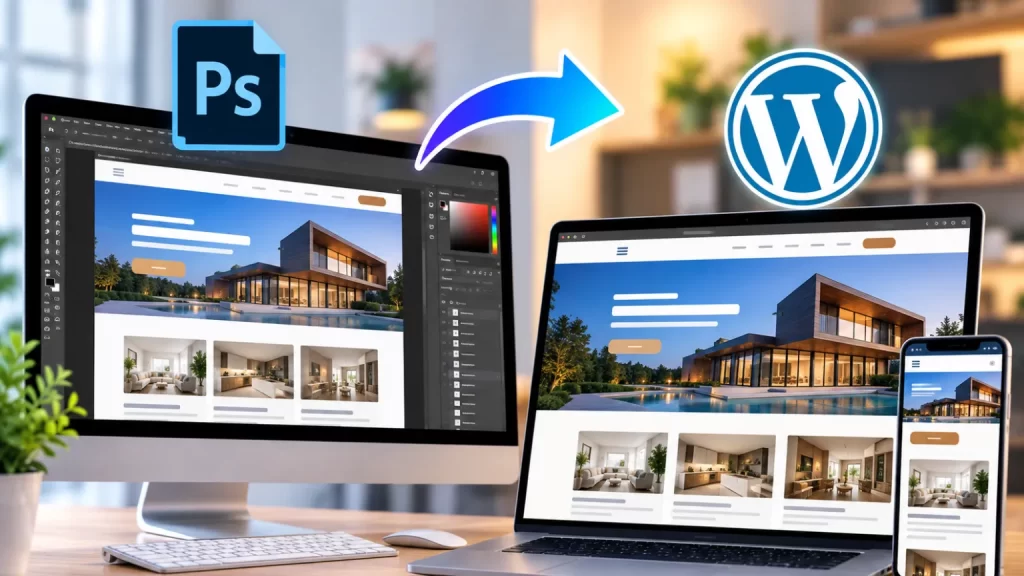
A PSD to WordPress conversion company helps businesses convert Photoshop website designs into fully functional WordPress websites. A PSD file can define the visual appearance of a website, but it does not provide the functionality needed for a live website. The design needs to be converted into responsive HTML, CSS, PHP and WordPress templates.
Table of Contents
A professional WordPress development company can transform PSD designs into responsive WordPress websites while maintaining the original layout, branding and visual details.
What Is PSD to WordPress Conversion?
PSD to WordPress conversion is the process of converting a Photoshop-based website design into a working WordPress website.
The process can include:
- Homepage design
- Inner pages
- Header
- Footer
- Navigation
- Blog layouts
- Contact pages
- Landing pages
- Custom sections
- Responsive layouts
The final website can be managed through the WordPress dashboard while maintaining the design provided in the PSD file.
9 Powerful Benefits of PSD to WordPress Conversion
1. Accurate Design Implementation
A PSD file provides detailed information about the website’s visual design.
Developers can convert elements such as:
- Colors
- Typography
- Spacing
- Buttons
- Images
- Icons
- Layouts
- Sections
into the WordPress website.
This helps the final website stay close to the approved design.
2. Responsive WordPress Website
A website needs to work across different screen sizes.
During PSD conversion, the design can be developed for:
- Desktop
- Laptop
- Tablet
- Mobile
Responsive CSS allows sections, images, navigation and content to adapt according to the screen size.
3. Custom WordPress Theme
A PSD design can be converted into a custom WordPress theme instead of using a generic pre-built theme.
A custom theme can include:
- Custom header
- Custom footer
- Homepage template
- Page templates
- Blog templates
- Archive pages
- Custom post type templates
WordPress provides official Theme Developer Resources for developers building and customizing WordPress themes.
4. SEO-Friendly Development
PSD files focus on design, while WordPress development determines how the content is structured.
A properly developed website can use:
- Semantic HTML
- Proper heading hierarchy
- SEO-friendly URLs
- Optimized images
- Internal links
- Mobile-friendly layouts
- Search-friendly content
Google’s Search Central documentation provides guidance for creating websites that are accessible and understandable to search engines.
5. Easy Content Management
One of the main benefits of WordPress is its content management system.
After PSD conversion, website administrators can update:
- Text
- Images
- Blog posts
- Services
- Team members
- Testimonials
- Pages
without manually editing every section of the website code.
6. Custom Functionality
A PSD design may include elements that require additional functionality.
For example:
- Sliders
- Contact forms
- Search
- Filters
- Dynamic content
- Custom post types
- Membership
- WooCommerce
- API integrations
These features can be implemented during WordPress development.
For more advanced functionality, a custom WordPress plugin can be developed separately from the theme.
7. Faster and Cleaner Development
A clear PSD design gives developers a visual reference before coding begins.
This helps developers understand:
- Page structure
- Design components
- Typography
- Colors
- Spacing
- Content hierarchy
Reusable WordPress components can then be created for sections that appear on multiple pages.
8. Better Long-Term Scalability
A properly structured WordPress website can grow as the business grows.
A website can start with:
Home → About → Services → Contact
and later add:
Blog → Case Studies → Resources → WooCommerce → Membership
A custom WordPress architecture can make these additions easier to manage.
9. Full Control Over Website Design
A custom PSD-to-WordPress conversion provides control over the final frontend implementation.
Developers can customize:
- Typography
- Animations
- Hover effects
- Responsive behavior
- Navigation
- Forms
- Content sections
- Page layouts
This is particularly useful when the PSD design is highly customized.
PSD to WordPress Conversion Process
Step 1: Analyze the PSD Files
The development team reviews:
- Page designs
- Fonts
- Colors
- Images
- Icons
- Layouts
- Responsive requirements
Step 2: Plan the WordPress Structure
The design is divided into reusable components such as:
- Header
- Hero section
- Content sections
- CTA
- Footer
Step 3: Develop the Theme
The required WordPress theme files and templates are created.
Step 4: Convert PSD Design Into Code
The PSD layout is converted into HTML, CSS, PHP and JavaScript.
Step 5: Add WordPress Functionality
Static sections are connected with WordPress so administrators can manage the content.
Step 6: Implement Responsive Design
The website is tested and adjusted for different screen sizes.
Step 7: Add Custom Features
Forms, sliders, dynamic content, WooCommerce or other required functionality can be integrated.
Step 8: Test the Website
The website is tested for:
- Responsive layouts
- Browser compatibility
- Navigation
- Forms
- Links
- Performance
- SEO
PSD Design vs WordPress Website
| PSD Design | WordPress Website |
|---|---|
| Static design | Functional website |
| Photoshop-based | Browser-based |
| No CMS | WordPress CMS |
| No database | Database-driven |
| Visual reference | Editable content |
| No user management | User management |
| No ecommerce by default | WooCommerce available |
| No dynamic content | Dynamic content |
PSD to WordPress for Business Websites
A PSD to WordPress conversion company can convert designs for many types of websites.
Examples include:
- Corporate websites
- Agency websites
- Startup websites
- Portfolio websites
- Service websites
- Educational websites
- NGO websites
- Healthcare websites
- Real estate websites
- Ecommerce websites
The WordPress implementation can be customized according to the business requirements.
PSD to WordPress for WooCommerce
PSD ecommerce designs can also be converted into WooCommerce websites.
Custom designs can be implemented for:
- Homepage
- Shop page
- Product categories
- Product pages
- Cart
- Checkout
- Customer account
This allows businesses to maintain their unique ecommerce branding instead of relying completely on a standard WooCommerce layout.
Mobile-Friendly PSD Conversion
A website should not simply reproduce the desktop PSD on smaller screens.
The development process should consider how each section behaves on mobile.
This may involve:
- Responsive navigation
- Flexible grids
- Responsive images
- Mobile typography
- Stacked sections
- Touch-friendly buttons
- Mobile-friendly forms
This helps provide a consistent experience across devices.
SEO During PSD to WordPress Conversion
SEO should be considered while developing the website.
Important elements include:
- Heading structure
- Page titles
- Meta descriptions
- Image ALT text
- URLs
- Internal links
- Mobile usability
- Page performance
Existing websites should also retain important URLs and content whenever possible.
Website Performance
A visually accurate website should also be optimized for performance.
Development can consider:
- Image compression
- WebP images
- Efficient CSS
- Optimized JavaScript
- Font loading
- Lazy loading
- Caching
- Lightweight templates
The final performance also depends on hosting, plugins, third-party scripts and website content.
Custom WordPress Theme vs Pre-Built Theme
| Feature | Pre-Built Theme | Custom Theme |
|---|---|---|
| Setup | Faster | Requires development |
| Design control | Limited by theme | High |
| PSD accuracy | May require compromises | High |
| Custom functionality | Theme dependent | Flexible |
| Code control | Limited | Full |
| Scalability | Depends on theme | High |
For a unique PSD design, custom theme development can provide greater control over the final website.
Common PSD to WordPress Conversion Mistakes
Ignoring Mobile Design
The website should be responsive rather than simply shrinking the desktop layout.
Using Too Many Plugins
Only necessary plugins should be installed.
Poor Image Optimization
Large PSD-exported images can make the website slow.
Ignoring SEO
SEO elements should be considered during development.
Hardcoding Everything
Content that business owners need to update should be connected to WordPress’s content management system.
Not Testing Forms
Contact and lead forms should be tested before launch.
How Much Does PSD to WordPress Conversion Cost?
The cost depends on the PSD design and required functionality.
A simple website may contain a few pages and standard functionality.
A larger project may require:
- Multiple page templates
- Custom post types
- WooCommerce
- Advanced animations
- API integrations
- Membership
- Custom dashboards
Therefore, an accurate estimate should be provided after reviewing the PSD files and project requirements.
How to Choose a PSD to WordPress Conversion Company
Before hiring a development company, check its experience with:
- WordPress
- Custom themes
- PSD conversion
- Responsive development
- PHP
- HTML/CSS
- JavaScript
- WooCommerce
- API integration
- Performance optimization
It is also useful to review previous projects and confirm that the developer can handle both design accuracy and WordPress functionality.
Frequently Asked Questions
What is PSD to WordPress conversion?
PSD to WordPress conversion is the process of turning a Photoshop website design into a functional WordPress website.
Can PSD designs be converted into a custom WordPress theme?
Yes. A custom theme can be developed according to the PSD design.
Will the final website look like the PSD?
The website can be developed to closely match the approved PSD design, including layout, typography, colors and spacing.
Can the website be responsive?
Yes. The PSD design can be converted into a responsive website for desktop, tablet and mobile devices.
Can WooCommerce be added?
Yes. PSD ecommerce designs can be converted into custom WooCommerce websites.
Can I edit the website after conversion?
Yes. Website content can be managed through the WordPress dashboard.
Can custom functionality be added?
Yes. Custom plugins, forms, filters, APIs and other features can be developed as required.
Is custom theme development better than a pre-built theme?
It depends on the project. A custom theme is useful when the design requires high levels of customization and control.
Final Thoughts
A PSD to WordPress conversion company helps businesses transform static Photoshop designs into functional, responsive and manageable WordPress websites.
The process combines accurate design implementation with WordPress development, allowing businesses to maintain their approved visual identity while gaining the flexibility of a content management system.
Whether the project is a corporate website, portfolio, service website or WooCommerce store, a properly developed WordPress implementation can provide a strong foundation for future growth.